Proxmox Storage Guide: ZFS, Ceph, and LVM-Thin Compared

This article is part of the Proxmox High Availability & Security series.
Selecting the storage architecture for a Proxmox VE (PVE) host is the single most consequential decision in your hypervisor build. Storage governs virtual machine input-output operations per second (IOPS), snapshot flexibility, memory consumption, and whether your cluster can execute automated failover during a hardware outage.
Many sysadmins default to ZFS because of its reputation for bulletproof data integrity, only to watch consumer solid-state drives burn through their write endurance in months. Others deploy Ceph across three nodes with gigabit networking, wondering why virtual disks freeze during trivial database queries. Meanwhile, traditional LVM-Thin configurations deliver blazing raw disk performance on single nodes while consuming almost zero host memory.
Each storage backend in Proxmox represents a distinct engineering compromise between hardware cost, operational complexity, and data safety. Understanding these trade-offs prevents painful post-deployment migrations.
The Storage Dilemma in Proxmox VE Deployments
Every hypervisor storage engine balances four competing requirements:
- Write Amplification and Drive Longevity: Copy-on-write mechanisms protect data integrity but multiply disk write cycles.
- Memory Footprint: High-end storage software caches metadata and read blocks in host RAM, competing directly with virtual machines for memory allocation.
- Snapshot and Replication Capabilities: Thin provisioning and instant point-in-time snapshots require sophisticated block tracking.
- Clustering and High Availability: Shared storage allows immediate live migration, whereas local storage requires asynchronous block replication.
Proxmox VE natively supports three primary local and distributed storage types: LVM-Thin, ZFS, and Ceph. Deploying the wrong backend for your hardware budget leads to severe input-output bottlenecks.
LVM and LVM-Thin: Raw Speed and Minimal Resource Overhead
Logical Volume Manager (LVM) is the traditional storage backbone of enterprise Linux. In Proxmox, LVM operates in two modes: standard thick-provisioned LVM and LVM-Thin.
How LVM-Thin Functions
Standard LVM allocates fixed physical extents to virtual disks at creation time. A 100GB virtual disk immediately consumes 100GB of raw physical blocks.
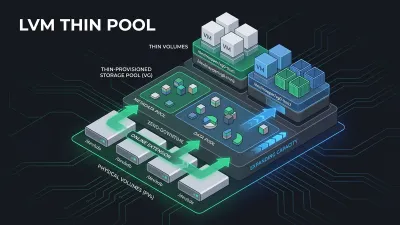
LVM-Thin introduces a thin pool consisting of two separate logical volumes:
- Data Pool: Stores actual written data blocks allocated dynamically on demand.
- Metadata Pool: Tracks which virtual block addresses map to physical extents within the data pool.
When a virtual machine requests a write to a new block, the Linux kernel device-mapper intercepts the request, assigns an unallocated block from the pool, updates the metadata log, and commits the write.
Operational Advantages of LVM-Thin
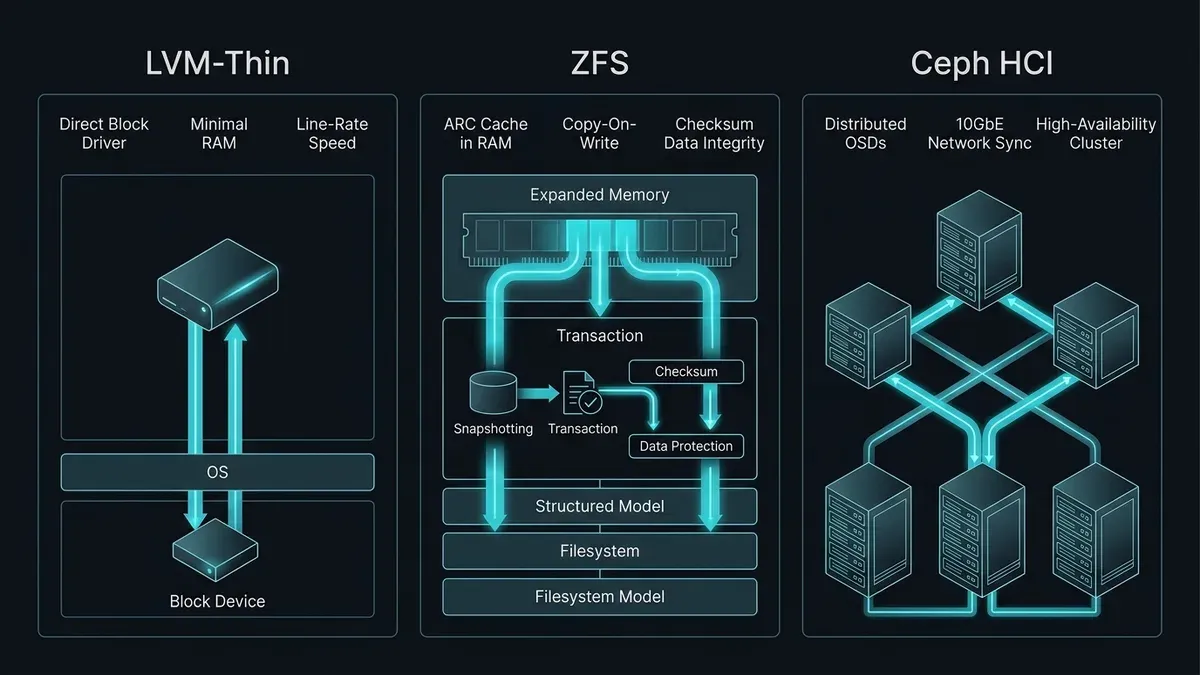
- Zero Memory Overhead: LVM-Thin operates directly inside the Linux device-mapper subsystem. Unlike ZFS, it requires no dedicated RAM cache. On an entry-level server with 32GB or 64GB of RAM, virtually all memory remains available for guest virtual machines.
- Negligible Write Amplification: Because LVM-Thin writes blocks directly to disk without complex checksum recalculations or multi-level journaling trees, write amplification is close to 1.0. Consumer NVMe drives and budget SSDs run safely without premature endurance exhaustion.
- Line-Rate Performance: Raw read and write latency matches bare-metal disk throughput. For latency-sensitive workloads like local Redis caches or monolithic relational databases on standalone nodes, LVM-Thin outperforms complex software storage.
Critical Operational Pitfalls
LVM-Thin is not without operational hazards. If a thin pool reaches 100 percent capacity, write operations freeze across every virtual machine sharing the pool. Guest filesystems can crash or enter read-only mode immediately.
Monitoring metadata utilization is equally vital. If metadata fills up while physical data capacity remains available, the pool locks up entirely. For detailed recovery steps during volume group corruption and metadata exhaustion, consult our guide on recovering from LVM volume group and logical volume errors. If disk drives drop out of volume groups during controller reboots, follow our runbook for troubleshooting missing disks in LVM pvscan.
ZFS on Linux: Enterprise Data Integrity with Memory Cost
ZFS is an integrated filesystem and logical volume manager designed around the principle that hardware storage will inevitably fail, lie, or corrupt silent blocks.
Core Architectural Strengths of ZFS
- End-to-End Checksumming: ZFS calculates a 256-bit cryptographic checksum for every data block and stores it in the parent block pointer. During reads, ZFS recalculates the checksum. If bit rot or silent controller corruption occurs, ZFS automatically reconstructs the damaged block using mirror or RAIDZ parity.
- Copy-on-Write (CoW): Modified blocks are written to unallocated sectors before metadata pointers update. Data on disk is never overwritten in place. This guarantees that power cuts or kernel panics cannot cause unrecoverable filesystem corruption.
- Instant Snapshots and Asynchronous Replication: Creating a ZFS snapshot takes milliseconds regardless of pool size. Using the
zfs sendandzfs receivepipeline, Proxmox VE can replicate virtual machine delta blocks to a secondary Proxmox host every minute for near-instant disaster recovery. For offsite storage with deduplication and client-side encryption, pair this local replication with hardening Proxmox Backup Server.
The True Cost: RAM Consumption and ARC Tuning
ZFS relies heavily on the Adaptive Replacement Cache (ARC). The ARC resides in host kernel memory, caching both frequently used and recently used disk blocks.
By default, ZFS on Linux will consume up to 50 percent of total system RAM for ARC. On a hypervisor with 128GB of memory, ZFS will claim up to 64GB unless explicitly constrained.
To prevent the ZFS ARC from starving virtual machines during memory allocation spikes, you must tune zfs_arc_max in /etc/modprobe.d/zfs.conf:
# Limit ZFS ARC to 16GB (value in bytes)
options zfs zfs_arc_max=17179869184
After modifying the configuration, update your initramfs and reboot:
update-initramfs -u -k allFor a deeper architectural breakdown comparing ZFS Adaptive Replacement Cache against native Linux page cache and Btrfs memory footprints, read our detailed guide on ZFS vs Btrfs on Linux servers.
The Consumer SSD Wear-Out Trap
ZFS requires significant metadata writes. When virtual machines issue small synchronous writes (common in databases and transactional web apps), ZFS commits them to the ZFS Intent Log (ZIL).
On consumer-grade SSDs lacking power-loss protection (PLP) capacitors, synchronous write performance plummets. Furthermore, write amplification factors (WAF) on consumer drives under ZFS can escalate to 5x or even 10x. A virtual machine writing 10GB of data per day can result in 100GB of physical writes to the underlying flash cells, destroying a drive with low terabytes-written (TBW) ratings within six to twelve months.
For production ZFS deployments, enterprise-grade SSDs (such as Intel/Solidigm D3 or Samsung PM893/PM9A3) featuring high endurance ratings and hardware PLP are mandatory.
Ceph HCI: Scale-Out Hyperconverged Storage for Multi-Node Clusters
Ceph is a distributed, open-source software-defined storage platform. In a Proxmox VE cluster, Ceph runs in a Hyperconverged Infrastructure (HCI) configuration, meaning the same physical servers act as compute nodes (running VMs) and storage nodes (hosting disks).
Core Components of a Ceph Cluster
A Ceph deployment inside Proxmox relies on several cooperative daemons:
- OSD (Object Storage Daemon): One daemon runs per physical disk drive. OSDs handle data storage, block replication, recovery, and rebalancing.
- MON (Monitor): Maintains master cluster maps, tracks node membership, and ensures cluster quorum. A minimum of three monitors is required for high availability. If network partitions or packet loss cause nodes to drop out of quorum, follow our runbook for Proxmox cluster quorum troubleshooting and Corosync recovery.
- MGR (Manager): Collects operational metrics, orchestrates dashboard views, and manages background modules.
- CRUSH Algorithm: Controlled Replication Under Scalable Hashing. Ceph does not rely on a centralized metadata lookup table. When a VM requests a block, the client calculates the exact physical OSD location mathematically using the CRUSH map.
The Network Imperative: Why 1GbE Guarantees Failure
The number one mistake in homelab and small business Proxmox clusters is attempting to run Ceph across standard 1-gigabit Ethernet networks.
Ceph uses synchronous network replication. When a virtual machine writes a block with a replication factor of 3 (size 3, min_size 2):
- The write sends to the primary OSD.
- The primary OSD writes to local disk and simultaneously transmits the write across the network to two replica OSDs on different physical nodes.
- The primary OSD waits for acknowledgment from the remote nodes before confirming completion to the guest operating system.
On a 1GbE network, network latency hovers around 1 to 2 milliseconds. A synchronous write pipeline quickly saturates available bandwidth, causing guest disk input-output wait (iowait) to climb to 80 percent. Virtual machines stutter, and database transactions time out.
Ceph requires a minimum of dedicated dual-port 10GbE networking, with 25GbE strongly recommended for all-flash NVMe pools. Separating Ceph cluster traffic (inter-OSD replication and rebalancing) from public client traffic is essential to prevent network storms from choking management interfaces.
Head-to-Head Comparison: Performance, Snapshots, and Resource Footprint
The following table summarizes the structural differences across the three storage engines:
| Feature | LVM-Thin | ZFS (Local Pool) | Ceph (Hyperconverged) |
|---|---|---|---|
| Architecture | Device-mapper block storage | Copy-on-Write local filesystem | Distributed object storage |
| Minimum Node Count | 1 Node | 1 Node | 3 Nodes (5 recommended) |
| RAM Overhead | Minimal (< 100MB) | High (1GB per 1TB + ARC limit) | Moderate (~2GB to 4GB RAM per OSD) |
| Snapshots | Supported (metadata overhead) | Instantaneous, unlimited | Instantaneous (RBD snapshots) |
| Shared Storage | No (Local to node only) | No (Requires asynchronous sync) | Yes (True distributed block device) |
| High Availability Failover | No | Manual or scripted replication | Fully automated zero-downtime HA |
| Disk Type Suitability | Consumer & Enterprise SSD/NVMe | Enterprise SSD/NVMe with PLP | Enterprise SSD/NVMe only |
| Write Amplification | Very Low (~1.0 to 1.2) | High (~3.0 to 8.0 on small writes) | High (Multiplied by replica count) |
| Network Dependency | None | None | Critical (10GbE / 25GbE mandatory) |
Decision Matrix: Choosing the Right Storage Backend for Your Workload
No single storage solution solves every operational scenario. Match your storage engine directly to your physical topology and application workload.
Scenario A: Single-Node Budget Server or Small Office Hypervisor
- Recommended Choice: LVM-Thin
- Rationale: If your server has 64GB of RAM and uses consumer NVMe drives without enterprise PLP capacitors, LVM-Thin maximizes usable RAM and preserves drive lifespan. It delivers exceptional raw I/O throughput for web applications and development environments without ARC configuration headaches.
Scenario B: Mission-Critical Enterprise Single-Node or Two-Node Pair
- Recommended Choice: ZFS (Mirror / RAID10)
- Rationale: If you possess enterprise NVMe drives and sufficient RAM, ZFS is the premier choice for protecting critical databases against silent bit rot. Pairing two PVE nodes with ZFS allows automated replication jobs via
pvesync, enabling warm failovers within minutes.
Scenario C: Three-Plus Node High-Availability Production Cluster
- Recommended Choice: Ceph RBD
- Rationale: When uninterrupted uptime is mandatory and budget permits dedicated 10GbE or 25GbE switching, Ceph provides unmatched resilience. If a physical hypervisor catches fire, surviving nodes immediately restart affected virtual machines without transferring a single gigabyte of storage, as disk blocks already reside across the distributed pool.
Mastering these infrastructure trade-offs is a fundamental requirement for systems engineers. The same judgment applies to everyday administration, from user and permission management to service troubleshooting across the nodes that host your storage.
Best Practices for Production Proxmox Storage Management
Regardless of your chosen backend, adhere to these production operational rules:
-
Never Exceed 80 Percent Pool Utilization:
- In LVM-Thin, running out of space freezes VMs across the pool.
- In ZFS, pool fragmentation spikes exponentially when capacity exceeds 80 percent, severely degrading copy-on-write performance.
- In Ceph, exceeding nearfull ratios (typically 75 to 80 percent) halts data rebalancing and triggers read-only safety locks.
-
Enable Discard and TRIM Support: Ensure the virtual disk configuration in PVE has
discard=onenabled. Inside Linux guests, enable thefstrim.timersystemd service:systemctl enable --now fstrim.timerThis ensures that deleted files inside virtual machines release allocated blocks back to the underlying LVM-Thin, ZFS, or Ceph pools.
-
Separate Virtual Machine OS Disks from Bulk Data: Store virtual machine boot operating systems on high-speed NVMe LVM-Thin or ZFS mirror pools. Route bulk storage (media archives, document storage, database backups) to separate storage pools backed by cost-effective rotational hard drives or remote network shares.
-
Monitor Host I/O Delay: Keep an eye on the Proxmox summary dashboard. An average
iowait(I/O Delay) consistently above 5 to 10 percent indicates that your storage backend cannot keep up with guest queue depths. Investigate disk saturation before guest operating systems experience kernel stalls.
By tailoring your storage backend to your physical hardware capabilities and clustering objectives, you build a Proxmox VE platform that delivers predictable performance, drive longevity, and seamless disaster recovery.
This article is part of the Proxmox High Availability & Security series.
Implementation Checklist
- Replicate the steps in a controlled lab before production changes.
- Document configs, versions, and rollback steps.
- Set monitoring + alerts for the components you changed.
- Review access permissions and least-privilege policies.
Official References
Need a Hand?
If you want this implemented safely in production, I can help with assessment, execution, and hardening.
Contact MeNeed an Offsite Backup Node or Corosync QDevice?
Deploy an independent cloud Droplet to act as a lightweight Corosync QDevice tiebreaker, remote PBS backup sync relay, or isolated test environment with $200 in free credits.
Transparency: We independently test and operate all recommended infrastructure. If you use our partner links, you receive free promotional credits and support our testing lab at zero extra cost to you.
Weekly Production DevOps Runbooks
Join 1,000+ infrastructure engineers receiving real-world Linux troubleshooting, Proxmox clustering setups, and Docker optimization runbooks every Tuesday. Zero spam, unsubscribe anytime.

About the Author
Kamandanu Wijaya
IT Infrastructure & Network Administrator
Infrastructure & network administrator with 15+ years of enterprise experience, focused on stability, security, and automation.
Certifications: Google IT Support, Cisco Networking Academy, DevOps.
How to Check MX Records: dig, nslookup & Online Tools
Next →Proxmox Backup Hardening: Immutability and Ransomware
Need IT Solutions?
DoWithSudo is ready to help setup servers, VPS, and your security systems.
Contact Us