Proxmox Quorum Loss: Fix Corosync and Split-Brain Loops

This article is part of the Proxmox High Availability & Security series.
Article Details
Category
SysAdminFew operational failures induce panic quite like a Proxmox VE (PVE) cluster losing quorum. One physical host reboots for scheduled maintenance or an upstream switch drops packets for twenty seconds, and suddenly your remaining hypervisors freeze. Virtual machine configurations lock up, the web console throws permission errors, and High Availability (HA) watchdogs trigger automated node fencing, sending surviving servers into endless reboot loops.
This behavior is not a software bug. It is a deliberate defensive mechanism engineered to prevent split-brain data corruption. When a clustered hypervisor cannot mathematically prove that it belongs to the majority partition, it disables write access to the shared cluster configuration file system (pmxcfs).
However, knowing why a cluster locks up does not help when production services are dark. Understanding Corosync consensus mechanics, executing emergency command-line overrides, and deploying external tiebreakers like Proxmox QDevice allows you to recover partitioned nodes and bulletproof your cluster against split-brain failures.
The Anatomy of Quorum Loss in Proxmox VE Clusters
In standalone Proxmox hosts, the local database manages configuration changes directly. In a cluster, configuration state is mediated by the Proxmox Cluster File System (pmxcfs), mounted at /etc/pve.
pmxcfs is a memory-backed, database-driven file system synchronized across all nodes using the Corosync cluster engine. To guarantee that two isolated nodes never execute conflicting writes to the same virtual machine configuration, pmxcfs requires quorum:
Quorum State = Active (Votes >= Majority Threshold)
  ├── /etc/pve mounted Read-Write
  ├── VM / Container creation, deletion, and edits allowed
  └── HA Manager manages resource state and migration

Quorum State = Lost (Votes < Majority Threshold)
  ├── /etc/pve falls back to Read-Only immediately
  ├── VM commands blocked (qm start, qm stop, pvesh fail)
  ├── Web interface reports authentication and API timeouts
  └── HA Watchdog fences the node via hardware reset within 60s
When quorum drops, any running virtual machines will initially continue executing their in-memory workloads. However, you cannot manage them. If the Web UI becomes unresponsive during a network partition, verify underlying service states using our guide on resolving Proxmox Web UI port 8006 connectivity failures. If HA is enabled on affected guests, the node watchdog will hard-reboot the physical hypervisor within sixty seconds to prevent split-brain disk corruption. Understanding how distributed locks operate on shared storage is vital before clustering guests. Compare pool mechanics in our Proxmox storage guide for ZFS, Ceph, and LVM-thin.
How Corosync and pmxcfs Establish Cluster Consensus
Corosync calculates quorum using a simple majority vote algorithm. In standard configurations, each physical node in the cluster possesses exactly one vote:
$$\text{Total Votes} = N$$
$$\text{Quorum Threshold} = \left\lfloor \frac{N}{2} \right\rfloor + 1$$
Let us examine how this formula behaves across typical cluster sizes.
The 3-Node Cluster (Resilient)
- Total Nodes: 3
- Total Votes: 3
- Quorum Threshold: $\lfloor 3 / 2 \rfloor + 1 = 2$ votes
- Fault Tolerance: If Node 3 fails, Nodes 1 and 2 retain 2 votes. $2 \ge 2$, so quorum remains intact. The cluster continues running uninterrupted.
The 2-Node Cluster Trap (Fragile)
- Total Nodes: 2
- Total Votes: 2
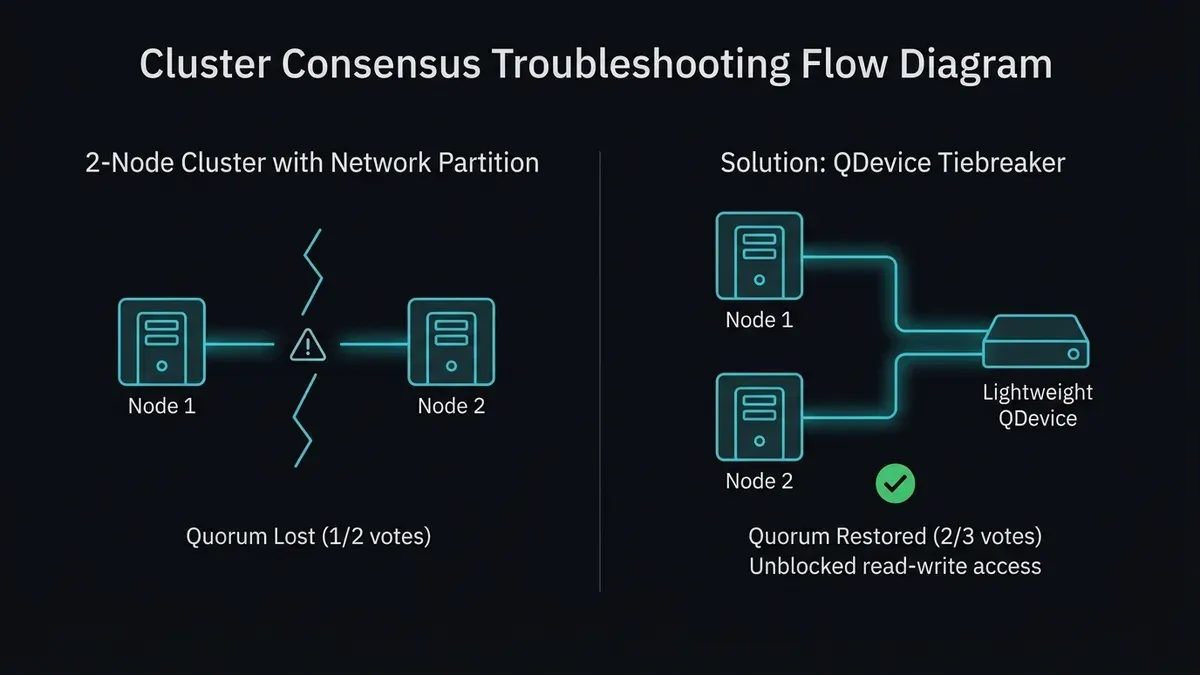
- Quorum Threshold: $\lfloor 2 / 2 \rfloor + 1 = 2$ votes
- Fault Tolerance: If Node 2 reboots, Node 1 retains only 1 vote. $1 < 2$, so quorum drops instantly. Node 1 locks
/etc/pveinto read-only mode and fences itself if HA services are running.
A two-node Proxmox cluster without an external tiebreaker has a fault tolerance of zero. Any disruption on either node downs the entire cluster.
Emergency Recovery: Restoring Quorum on a Partitioned Node
When an unexpected outage isolates a node and leaves it stuck in a non-quorate state, you must regain administrative control to inspect virtual machines and resume operations.
Step 1: Diagnose Cluster Quorum Status
Log in to the isolated node via physical console or out-of-band IPMI/SSH. Run pvecm status:
pvecm statusIn a partitioned scenario, the output will expose the quorum failure:
Cluster information
-------------------
Name:             production-cluster
Config Version:   4
Transport:        knet
Secure auth:      on

Quorum information
------------------
Date:             Fri Sep 11 10:15:00 2026
Quorum provider:  corosync_kronos
Nodes:            1
Node ID:          0x00000001
Ring ID:          1.1a
Quorate:          No

Voteinformation
----------------
Expected votes:   3
Highest expected: 3
Total votes:      1
Node votes:       1
Notice Quorate: No and Total votes: 1 against Expected votes: 3. The hypervisor refuses to accept write commands.
Verify the Corosync communication ring health across network interfaces:
corosync-cfgtool -sIf link status reports FAULTY or displays failed transmission counts, Corosync cannot establish heartbeat packets with neighboring nodes.
Step 2: Override Expected Votes via CLI
To temporarily force the isolated node back into a quorate state, instruct Corosync to reduce its expected vote count to 1:
pvecm expected 1Run pvecm status again immediately. You will observe that Quorate switches from No to Yes:
Quorum information
------------------
Quorate:          Yes

Voteinformation
----------------
Expected votes:   1
Total votes:      1
Node votes:       1
The moment Quorate: Yes is achieved, /etc/pve remounts in read-write mode. You can now start, stop, or migrate virtual machines using standard qm commands:
qm list
qm start 102
The Cardinal Rule of pvecm expected 1
pvecm expected 1 is an emergency runtime override stored only in volatile memory. It does not persist across reboots.
More critically, you must never run pvecm expected 1 on two partitioned sides of an active network split simultaneously. If Node 1 and Node 2 are separated by a severed network switch and you force quorum on both sides, both nodes will attempt to run the same virtual machines against shared storage. Both will write to the same virtual disk images, resulting in unrecoverable filesystem destruction.
Use pvecm expected 1 only when you know for certain that the other nodes are physically powered down or isolated from shared disks.
Permanent Fix for 2-Node Clusters: Configuring Proxmox QDevice
If you run a two-node Proxmox cluster in a small office or homelab, you must install an external tiebreaker using corosync-qdevice.
A QDevice is an ultra-lightweight daemon running on an independent third system outside the PVE cluster. This system can be a low-power Raspberry Pi, a small Linux virtual machine hosted on an external cloud provider, or a physical network gateway running Debian or Ubuntu.
[ Proxmox Node 1 ] (1 Vote) ──┐
                              ├──> Total Votes: 3 (Quorum = 2)
[ Proxmox Node 2 ] (1 Vote) ──┤
                              │
[ External QDevice ] (1 Vote) ┘
(Raspberry Pi / Cloud VPS)
With the QDevice active:
- Total cluster votes increase from 2 to 3.
- Quorum threshold remains at 2.
- If Node 2 goes offline, Node 1 (1 vote) and the QDevice (1 vote) total 2 votes. $2 \ge 2$, so Node 1 remains quorate and operational.
Step 1: Prepare the External QDevice Machine
On your external third machine (e.g., Debian 12 / Ubuntu 24.04), install the Corosync QNet daemon:
apt update
apt install corosync-qnetd -y
systemctl enable --now corosync-qnetd
Confirm that the daemon listens on TCP port 5403:
ss -tulpn | grep 5403Step 2: Install QDevice on Proxmox VE Nodes
On both Proxmox VE hypervisor nodes, install the QDevice package:
apt update
apt install corosync-qdevice -y
Step 3: Initialize QDevice Integration
From the primary Proxmox VE node, initiate the setup by pointing to the IP address of the external machine:
pvecm qdevice setup 192.168.1.50The script will prompt for the root password of the external machine, establish an SSH session, generate cryptographic certificates, and distribute the QDevice configuration across all cluster nodes automatically.
Verify that the QDevice is active and casting votes:
pvecm statusLook for the Qdevice entry in the output:
Voteinformation
----------------
Expected votes:   3
Highest expected: 3
Total votes:      3
Node votes:       1
Qdevice votes:    1
Now, either hypervisor node can reboot, crash, or undergo kernel upgrades without threatening cluster quorum.
Network Architecture: Isolating Corosync to Prevent Latency Spikes
Corosync is an ultra-sensitive real-time communication protocol. It sends small heartbeat packets at strict sub-second intervals (typically every 200 milliseconds).
If network latency between nodes exceeds the Corosync token timeout (default: 1000 milliseconds), Corosync assumes the remote node has died, drops the link, and triggers a cluster partition.
The most common cause of spontaneous quorum drops is running Corosync across a shared physical network interface that gets overwhelmed by bulk traffic. When a large backup job starts, or when Ceph initiates background rebalancing, storage I/O saturates the gigabit link. Corosync heartbeats queue up behind megabytes of backup data, time out, and fracture the cluster.
Best Practice: Dual-Ring Redundant Corosync Links
Always configure Corosync with two independent physical network links. In /etc/pve/corosync.conf, declare Link 0 as your primary low-latency interface and Link 1 as a fallback interface:
totem {
    version: 2
    secauth: on
    cluster_name: production-cluster
    config_version: 5
    ip_version: ipv4
    link_mode: passive
    interface {
        linknumber: 0
        knet_transport: pmxcfs
    }
    interface {
        linknumber: 1
        knet_transport: pmxcfs
    }
}

nodelist {
    node {
        ring0_addr: 10.10.10.11
        ring1_addr: 192.168.1.11
        name: pve-node-01
        nodeid: 1
        quorum_votes: 1
    }
    node {
        ring0_addr: 10.10.10.12
        ring1_addr: 192.168.1.12
        name: pve-node-02
        nodeid: 2
        quorum_votes: 1
    }
}- Link 0 (
10.10.10.x): Dedicated physical network cable, isolated VLAN, or direct point-to-point DAC cable connecting nodes directly without crossing general office switches. - Link 1 (
192.168.1.x): Standard management network interface acting as a backup communication channel.
If you must connect geographically dispersed Proxmox nodes across untrusted WAN networks, never expose raw Corosync ports to the open internet. Encapsulate communication inside an encrypted, low-latency overlay network using our Tailscale mesh VPN setup guide.
Resolving Corosync Network Partitions and Corrupted Cluster Configurations
When permanently decommissioning a failed node from a cluster, executing the removal incorrectly can permanently break Corosync consensus.
The Proper Way to Remove a Decommissioned Node
Never simply power down an unwanted node and leave its configuration behind. If a node is gone forever:
- Power off the decommissioned node permanently.
- From an active, quorate node, execute:
pvecm delnode pve-failed-node - Verify that
/etc/pve/nodes/no longer contains the old node directory. If an empty directory remains, archive and remove it:rm -rf /etc/pve/nodes/pve-failed-node
Recovering from Corrupted corosync.conf Edits
If /etc/pve/corosync.conf becomes corrupted due to manual syntax errors or mismatched version numbers, the Corosync service will fail to start on boot:
- Stop the Corosync and pmxcfs services:
systemctl stop pve-cluster corosync - Start the cluster file system in local, non-clustering mode:
pmxcfs -l - With local mode active,
/etc/pvebecomes writable again. Correct the syntax errors in/etc/pve/corosync.confand ensureconfig_versionis incremented by at least 1:nano /etc/pve/corosync.conf - Kill the local file system process and restart standard clustering services:
killall pmxcfs
systemctl start pve-cluster corosync
Mastering Linux service debugging and system rescue techniques is crucial for hypervisor maintenance. For broader foundational command-line workflows, review our basic Linux system administration guide.
High Availability Watchdog and Fencing Safety Checklist
To prevent destructive fencing loops during maintenance, verify your HA watchdog configuration:
- Odd Number of Votes Maintained: Ensure total cluster votes equal an odd number (3, 5, or 2 nodes + 1 QDevice).
- Dual Corosync Links Configured: Deploy Link 0 on dedicated, non-blocking network hardware and Link 1 as fallback.
- Separate Storage and Cluster Traffic: Never allow backup or Ceph replication traffic to saturate Corosync links. Isolate dedicated backup subnets when pushing snapshots to your hardened Proxmox Backup Server repository.
- Hardware Watchdog Configured: Verify that a reliable Linux watchdog kernel module (e.g.,
ipmi_watchdogoriTCO_wdt) is active:cat /sys/class/watchdog/watchdog0/identity - Maintenance Mode Applied Before Reboots: Place nodes into HA maintenance mode before restarting physical servers to migrate workloads cleanly and disable local fencing:
ha-manager crm-command node-maintenance enable <nodename>
By understanding the mathematical necessity of quorum and engineering proper network separation, you transform Proxmox clustering from a fragile operational hazard into a resilient, enterprise-grade virtualization infrastructure.
This article is part of the Proxmox High Availability & Security series.
Implementation Checklist
- Replicate the steps in a controlled lab before production changes.
- Document configs, versions, and rollback steps.
- Set monitoring + alerts for the components you changed.
- Review access permissions and least-privilege policies.
Official References
Need a Hand?
If you want this implemented safely in production, I can help with assessment, execution, and hardening.
Contact MeNeed an Offsite Backup Node or Corosync QDevice?
Deploy an independent cloud Droplet to act as a lightweight Corosync QDevice tiebreaker, remote PBS backup sync relay, or isolated test environment with $200 in free credits.
Transparency: We independently test and operate all recommended infrastructure. If you use our partner links, you receive free promotional credits and support our testing lab at zero extra cost to you.
Weekly Production DevOps Runbooks
Join 1,000+ infrastructure engineers receiving real-world Linux troubleshooting, Proxmox clustering setups, and Docker optimization runbooks every Tuesday. Zero spam, unsubscribe anytime.

About the Author
Kamandanu Wijaya
IT Infrastructure & Network Administrator
Infrastructure & network administrator with 15+ years of enterprise experience, focused on stability, security, and automation.
Certifications: Google IT Support, Cisco Networking Academy, DevOps.
Proxmox Backup Hardening: Immutability and Ransomware
Next →DeepSeek V4.1 Flash: How the 890-Byte KV Cache Works
Need IT Solutions?
DoWithSudo is ready to help setup servers, VPS, and your security systems.
Contact Us