ZFS vs Btrfs on Linux: Snapshots, RAID, and RAM Overhead
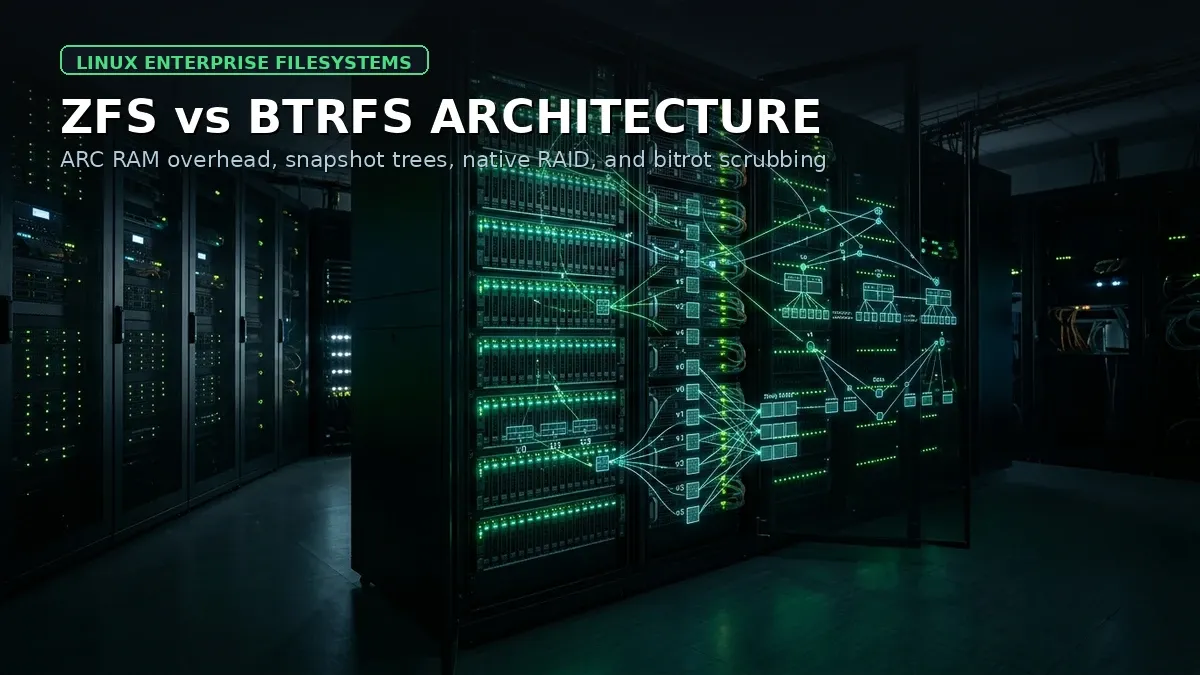
When architects design storage subsystems for production Linux environments, the debate inevitably consolidates into a choice between OpenZFS and Btrfs. Both filesystems abandon the legacy in-place modification model used by Ext4 and XFS in favor of advanced Copy-on-Write (CoW) mechanics, end-to-end data checksumming, and instantaneous tree-based snapshots.
Yet underneath their shared CoW principles, ZFS and Btrfs embody completely different design philosophies. OpenZFS operates as an enterprise-grade, self-contained volume manager that aggressively bypasses the Linux Virtual File System (VFS) cache to manage memory through its own Adaptive Replacement Cache (ARC). Btrfs, by contrast, is built directly into the mainline Linux kernel, relying on the native Linux Page Cache and dynamic extent allocation.
Choosing the wrong filesystem can lead to catastrophic memory exhaustion in containerized clusters, silent data corruption during parity disk rebuilds, or crippling I/O fragmentation on random write databases. In this guide, we break down the architectural divergence between OpenZFS and Btrfs, analyze their real-world memory footprints, evaluate snapshot replication performance, and explain why the notorious Btrfs RAID5/6 write hole still dictates production decisions.
The Copy-on-Write Storage Philosophy
Traditional Linux filesystems like Ext4 overwrite data directly in place. When an application modifies a 4 KB block on disk, the storage controller writes the new bits directly over the old physical sectors. If power is lost mid-write, the filesystem relies on journal replays to salvage consistency, but silent bit rot (where physical magnetic or flash decay flips bits without returning an I/O error) passes undetected until corrupted data crashes an application.
Copy-on-Write fundamentally re-architects this flow:
[ Application writes modified block B ]
                  │
                  ▼
[ Step 1: Write B' to an unallocated physical sector ]
                  │
                  ▼
[ Step 2: Compute cryptographic checksum of B' ]
                  │
                  ▼
[ Step 3: Atomic pointer update in parent metadata tree ]
                  │
                  ▼
[ Step 4: Old block B marked free only after commit ]
Because existing blocks are never overwritten, historical filesystem states can be frozen instantly as read-only snapshots with zero data duplication. Furthermore, because both ZFS and Btrfs store cryptographic checksums for every data block and metadata pointer, every read request verifies payload integrity. If a checksum fails, self-healing routines automatically reconstruct the uncorrupted block from a parity drive or mirror.
Architecture: Kernel Invariant vs Mainline Integration
The most fundamental operational difference between the two systems is their relationship with the Linux kernel itself.
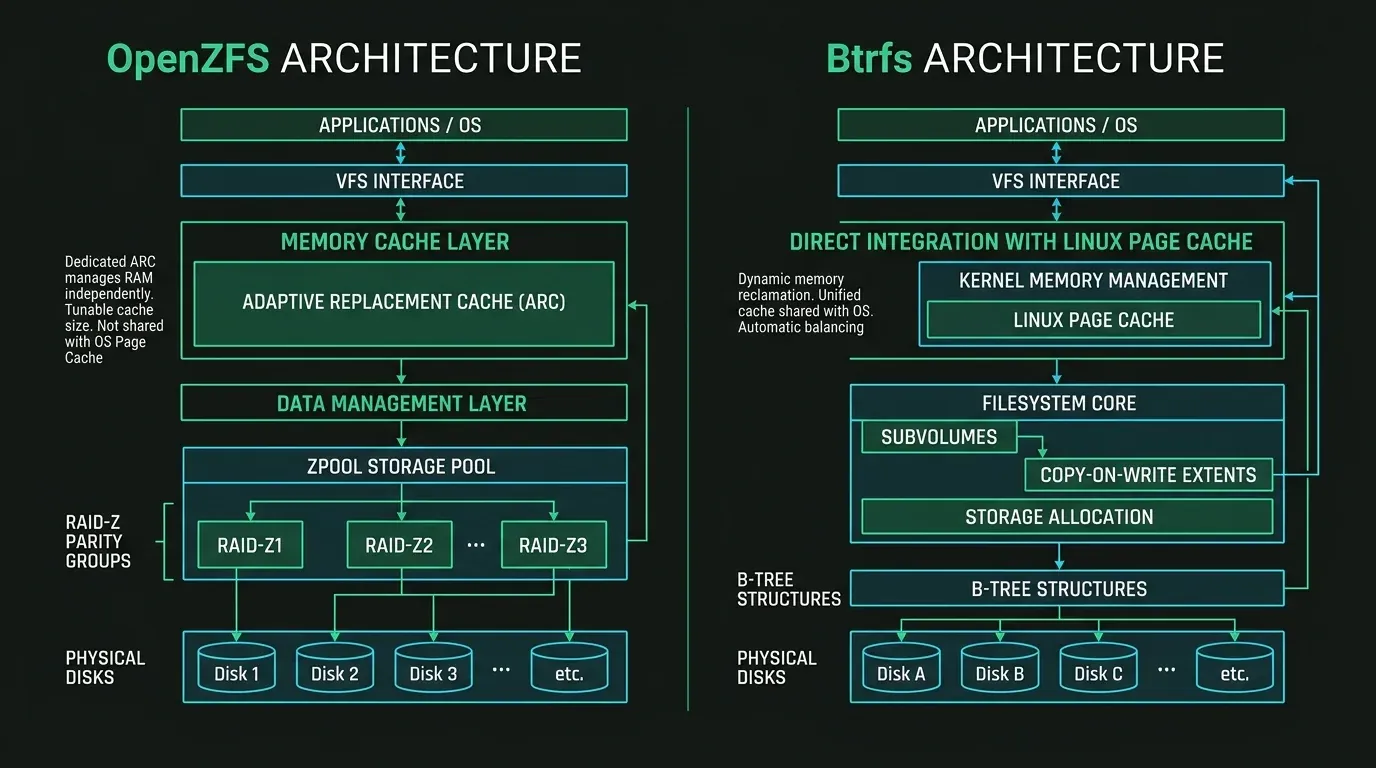
1. OpenZFS: The Self-Contained Storage Appliance
OpenZFS originated on Sun Solaris under the CDDL (Common Development and Distribution License). Because the CDDL is legally incompatible with the Linux kernel’s GPLv2, ZFS cannot be merged into the mainline Linux tree. On distributions like Debian, Ubuntu, Rocky, and Proxmox VE, ZFS runs as an external kernel module compiled via DKMS or shipped as pre-built binary packages.
To survive across disparate Unix platforms (Solaris, FreeBSD, illumos, and Linux), ZFS brought its own abstractions with it:
- Solaris Porting Layer (SPL): A kernel compatibility shim that mimics Solaris kernel APIs.
- Combined Volume Manager and Filesystem: ZFS completely obsoletes Linux software RAID (
mdadm) and LVM (lvm2). The ZFS storage pool (zpool) directly allocates raw block devices into Virtual Devices (vdevs), managing RAID geometry internally. - Independent Caching Architecture: ZFS does not use the standard Linux Page Cache for caching file reads. Instead, it implements the Adaptive Replacement Cache (ARC), managing physical RAM via its own memory allocation algorithms.
2. Btrfs: Native Linux Kernel Engineering
Btrfs (B-tree Filesystem) was designed from day one by Chris Mason and kernel maintainers specifically for the Linux kernel under the GPL license. It is built directly into every modern Linux distribution kernel without third-party modules or licensing hurdles.
- VFS Native: Btrfs integrates directly with the Linux Virtual File System switch. It hooks into the Linux kernel Page Cache, meaning file data cached by Btrfs is managed by the kernel’s native page reclamation algorithms.
- Subvolumes Instead of Datasets: Btrfs subvolumes act like independent root trees within a single filesystem pool. You can mount individual subvolumes with different mount options (such as compression algorithms or read-only flags) without slicing disk partitions.
- Chunk-Based Allocation: Rather than locking disks into rigid vdev stripes, Btrfs allocates storage in variable chunks (typically 1 GB for data chunks, 256 MB for metadata chunks) across available drives.
Memory Management: ARC Cache vs The Linux Page Cache
The memory profile of ZFS versus Btrfs is the single most common source of production confusion for systems administrators.
ZFS Adaptive Replacement Cache (ARC)
ZFS was designed under the assumption that RAM should be used aggressively to accelerate I/O. By default on Linux, OpenZFS configures its ARC cache to consume up to 50% of total host RAM:
# Check ARC memory consumption on a running Linux server
cat /proc/spl/kstat/zfs/arcstats | grep -E 'size|c_max|c_min'
Unlike the standard Linux page cache (which the kernel can evict in nanoseconds when an application requests anonymous memory), the ZFS ARC is managed by a background kernel thread. When a memory-heavy process (such as a MySQL container or a Java JVM) suddenly bursts and requests RAM, ZFS must shrink the ARC asynchronously.
If memory pressure spikes faster than the ARC shrinking thread can release pages, the Linux kernel encounters an Out-Of-Memory condition and triggers the OOM killer, terminating random production processes.
Production ARC Tuning
To prevent ZFS from competing with application workloads on dedicated application or hypervisor hosts, you must manually cap the ARC maximum limit in /etc/modprobe.d/zfs.conf:
# /etc/modprobe.d/zfs.conf
# Restrict ARC to 8 GB max (8 * 1024 * 1024 * 1024 bytes)
options zfs zfs_arc_max=8589934592

# Ensure ARC does not drop below 2 GB
options zfs zfs_arc_min=2147483648
Apply the changes and reload the kernel module parameters:
sudo update-initramfs -u -k allBtrfs and The Unified Page Cache
Btrfs does not implement an independent memory cache. When applications read files from a Btrfs filesystem, the pages reside directly in the standard Linux Page Cache (Cached in /proc/meminfo or free -h):
free -hBecause the memory is tracked directly by the kernel’s Least Recently Used (LRU) page lists:
- Memory reclamation is instantaneous. When an application needs memory, the kernel drops clean Btrfs file cache pages synchronously without any IPC or module coordination delays.
- You never need to configure maximum or minimum cache limits for Btrfs.
- Total memory overhead of Btrfs idle kernel structures is typically under 150 MB.
Verdict on Memory: If you are operating a memory-constrained virtual server (under 8 GB RAM) running heavy user-space workloads, Btrfs provides a much lighter, maintenance-free footprint. If you have 64 GB+ RAM on a dedicated storage node or virtualization host, the ZFS ARC delivers vastly superior read cache hit ratios due to its sophisticated MRU (Most Recently Used) and MFU (Most Frequently Used) algorithms.
Snapshot Mechanics and Send/Receive Replication
Both filesystems excel at instantaneous snapshot generation, but their replication pipelines diverge significantly under high-volume production churn.
1. Creating Snapshots
On ZFS, taking an atomic snapshot of a dataset is instantaneous:
sudo zfs snapshot rpool/data/postgres@backup_2026_09_14On Btrfs, snapshots are subvolumes created using the btrfs subvolume snapshot command:
sudo btrfs subvolume snapshot -r /data/postgres /data/postgres_snapshots/backup_2026_09_14Notice the -r flag on Btrfs. Btrfs allows snapshots to be created as read-write by default. In production, always enforce read-only (-r) snapshots if you intend to use them as incremental replication sources.
2. Incremental Send and Receive Pipelines
Both filesystems allow you to calculate binary deltas between two snapshot states and stream the raw serialized blocks over SSH to an offsite disaster recovery server:
# ZFS incremental replication stream
zfs send -i rpool/data@snap1 rpool/data@snap2 | pv | ssh backup-node "zfs receive backuppool/data"
# Btrfs incremental replication stream
btrfs send -p /data/snapshots/snap1 /data/snapshots/snap2 | pv | ssh backup-node "btrfs receive /backup/data"The Performance Reality Under File Churn
While both commands look similar, their internal block traversal behaves differently under heavy random write fragmentation:
- ZFS Dataset Object Sets: ZFS maintains a dedicated object set table and block allocation map for every transaction group (
txg). Calculating the difference betweensnap1andsnap2is an efficient sequential metadata read. - Btrfs B-Tree Walking: Btrfs must walk the metadata extent B-trees to calculate modified references. If a filesystem contains millions of small files with frequent modifications,
btrfs sendcan consume significant CPU and take several minutes just to generate the stream manifest before transmitting a single byte.
For large-scale backup targets and enterprise disaster recovery, ZFS send/receive remains significantly faster and more predictable, which is why platforms like Proxmox Backup Server and TrueNAS standardize on ZFS primitives, as explored in our Proxmox storage architecture guide.
Parity RAID: RAID-Z vs The Btrfs RAID5/6 Write Hole
If you plan to pool multiple physical hard drives or SSDs into a parity RAID array (similar to hardware RAID 5 or RAID 6), the choice between ZFS and Btrfs is cut and dried.
┌─────────────────────────────────────────────────────────────┐
│             THE RAID WRITE HOLE EXPLAINED                   │
│                                                             │
│  Drive 1 (Data):    [ D1 ] ──► Write succeeded              │
│  Drive 2 (Data):    [ D2 ] ──► Write succeeded              │
│  Drive 3 (Parity):  [ P  ] ──► POWER FAILURE DURING WRITE! │
│                                                             │
│  State after reboot:                                        │
│  D1 and D2 have new data, but P contains stale parity bits. │
│  If Drive 1 fails later, recalculating D1 from D2 and P     │
│  results in SILENT, UNRECOVERABLE DATA CORRUPTION.          │
└─────────────────────────────────────────────────────────────┘
The Btrfs RAID5/6 Write Hole Bug
In standard RAID 5, when you update a data block, the parity block on another drive must also be updated. If the host loses power or crashes between writing the data block and writing the parity block, the parity information becomes mathematically out of sync with the data. This is known as the RAID Write Hole.
- Btrfs Status: While Btrfs RAID0, RAID1, and RAID10 are rock-solid and enterprise-ready, Btrfs RAID5 and RAID6 remain officially discouraged for production data.
- Despite years of patches, edge-case power outages during write transactions can corrupt the parity tree. If a drive fails subsequently, the scrub process may overwrite good data blocks with corrupt parity calculations.
- While recovery modes and metadata duplication options exist, the Linux kernel documentation continues to warn administrators against storing critical data on Btrfs RAID5/6 profiles.
How ZFS Solves the Write Hole with RAID-Z
ZFS eliminates the write hole entirely by making parity writes an inherent part of its atomic transaction group mechanism:
- ZFS uses dynamic stripe widths rather than fixed-size hardware stripes.
- When ZFS writes a RAID-Z block, it writes both the data and the parity blocks to new unallocated sectors simultaneously in a single atomic transaction.
- If power fails mid-write, the pointer to the entire transaction group is never committed to the uberblock. On reboot, ZFS simply ignores the incomplete blocks and rolls back to the previous consistent state.
- Result: RAID-Z1 (single parity), RAID-Z2 (dual parity), and RAID-Z3 (triple parity) are immune to the write hole by design and have been rock-solid in production for over two decades.
Day-2 Operations: Maintenance and Pool Management
Storage arrays are living systems that require regular scrubbing, defragmentation, and drive replacements.
1. Data Scrubbing (Bit-Rot Detection)
Both filesystems provide online data scrubbing routines that traverse every allocated block on disk, compute its checksum, compare it against the stored metadata hash, and repair damaged sectors automatically from mirror or parity drives.
# ZFS: Start background scrub
sudo zpool scrub tank

# ZFS: Check scrub status and error counts
sudo zpool status tank
# Btrfs: Start background scrub on mountpoint
sudo btrfs scrub start /mnt/storage
# Btrfs: Inspect scrub progress
sudo btrfs scrub status /mnt/storageBoth scrub implementations are non-blocking and can run online during active production without unmounting the filesystem.
2. Btrfs Balancing vs ZFS Immutability
Btrfs uses a unique operational concept called balancing. Because Btrfs allocates raw storage into discrete 1 GB data chunks and 256 MB metadata chunks, deleting millions of small files can leave thousands of chunks only 5% utilized. The filesystem may report “No space left on device” (ENOSPC) even when df -h claims 40% free space, because all unallocated raw disk space has been claimed by empty metadata chunks.
To compact allocated chunks and free raw space, Btrfs administrators must run periodic balance operations:
# Reallocate data chunks that are less than 50% full
sudo btrfs balance start -dusage=50 -musage=50 /mnt/storage
ZFS does not have chunk balancing. Space allocation is managed globally across the pool. However, ZFS historically had a different limitation: vdev expansion immutability. Until OpenZFS 2.3 introduced RAID-Z expansion, adding a single disk to an existing RAID-Z2 vdev was impossible, forcing you to destroy the pool or add an entire new vdev of matching width.
Production Decision Matrix
| Storage Requirement | Winner | Engineering Rationale |
|---|---|---|
| Root OS Drive (Laptops / Cloud VPS) | Btrfs | Native kernel support, zero third-party modules, light memory footprint, automatic integration with distro package managers (Snapper/Timeshift). |
| Parity Storage Arrays (NAS / SAN) | ZFS | RAID-Z1/Z2/Z3 provides bulletproof immunity to the write hole, whereas Btrfs RAID5/6 is not production-safe. |
| High-RAM Hypervisors (Proxmox / KVM) | ZFS | Adaptive Replacement Cache (ARC) delivers superior read caching and hit ratios on large physical RAM systems. |
| Low-RAM Edge Servers (< 4 GB RAM) | Btrfs | Native Page Cache integration prevents out-of-memory kernel panics without manual modprobe tuning. |
| Disaster Recovery & Replication | ZFS | Fast, sequential zfs send/receive streams outperform Btrfs B-tree walks under high file modification churn. |
| Mixed Drive Capacities in Mirror | Btrfs | Btrfs can pool asymmetric drive sizes (e.g. 2 TB + 4 TB + 8 TB) in RAID1 mode, maximizing usable capacity. ZFS vdevs require identical disk sizes for efficiency. |
| Out-of-Tree Kernel Maintenance | Btrfs | Zero DKMS rebuilding headaches during major Linux kernel security updates. |
Infrastructure Monetization & Storage Cloud Recommendation
Deploy High-Performance Storage Volumes on DigitalOcean
Need ultra-fast NVMe block storage or high-memory compute droplets to run enterprise storage engines and backup replication targets? Spin up dedicated cloud infrastructure in seconds.
Get $200 Free Credit on DigitalOceanKey Takeaways and Storage Runbook
Neither OpenZFS nor Btrfs is universally superior. Instead, they serve two distinct tiers of infrastructure architecture:
- Deploy Btrfs for Root Drives and Single/Mirrored Disks: When building single-node cloud servers, developer workstations, or endpoints with less than 16 GB of RAM, Btrfs offers CoW snapshots, transparent zstd compression, and easy subvolume management without the operational overhead of ARC tuning or DKMS module maintenance.
- Deploy OpenZFS for Multi-Disk Arrays and Enterprise Pools: When building multi-terabyte storage servers, virtualization clusters, or backup repositories utilizing parity RAID, OpenZFS is the gold standard. Its proven RAID-Z reliability, sophisticated ARC caching, and high-speed replication pipelines make it the premier choice for mission-critical storage reliability.
- Always Cap ZFS ARC on Hypervisors: If running ZFS alongside container runtimes or virtual machines, explicitly configure
zfs_arc_maxin/etc/modprobe.d/zfs.confto prevent sudden memory pressure from triggering the Linux OOM killer. - Never Use Btrfs for RAID5 or RAID6: Stick strictly to Btrfs RAID1 or RAID10 profiles for multi-drive pools. If parity storage is mandatory, deploy ZFS RAID-Z2.
For broader systems reliability and volume troubleshooting, explore our step-by-step runbook on recovering LVM disk volume groups and our foundational guide to Linux server hardening best practices.
Implementation Checklist
- Replicate the steps in a controlled lab before production changes.
- Document configs, versions, and rollback steps.
- Set monitoring + alerts for the components you changed.
- Review access permissions and least-privilege policies.
Official References
Need a Hand?
If you want this implemented safely in production, I can help with assessment, execution, and hardening.
Contact MeNeed an Offsite Backup Node or Corosync QDevice?
Deploy an independent cloud Droplet to act as a lightweight Corosync QDevice tiebreaker, remote PBS backup sync relay, or isolated test environment with $200 in free credits.
Transparency: We independently test and operate all recommended infrastructure. If you use our partner links, you receive free promotional credits and support our testing lab at zero extra cost to you.
Weekly Production DevOps Runbooks
Join 1,000+ infrastructure engineers receiving real-world Linux troubleshooting, Proxmox clustering setups, and Docker optimization runbooks every Tuesday. Zero spam, unsubscribe anytime.

About the Author
Kamandanu Wijaya
IT Infrastructure & Network Administrator
Infrastructure & network administrator with 15+ years of enterprise experience, focused on stability, security, and automation.
Certifications: Google IT Support, Cisco Networking Academy, DevOps.
DeepSeek V4.1 Flash: How the 890-Byte KV Cache Works
next →WireGuard vs Tailscale: Performance, Relays, and Overhead
Need IT Solutions?
DoWithSudo is ready to help setup servers, VPS, and your security systems.
Contact Us