Proxmox ZFS Native Encryption: Setup, Keyload, and Unlock
In late 2024 a client closed a small rack in a Jakarta colocation facility and asked me to wipe two 2U servers before a recycler collected them. The servers had run a Proxmox VE cluster for four years. The hypervisor root disks were LUKS encrypted, so I assumed client data was covered too. Then I ran one command on the storage pool.
zfs get -r encryption tankEvery dataset returned off. The VM disks, the nightly snapshots, an invoicing database, all of it sat readable on 8 TB of spinning rust and 2 TB of NVMe. The recycler had a thirty minute collection window. I pulled the drives by hand, logged an emergency change request, and spent two evenings shredding twelve disks with hdparm --security-erase and nvme format.
That mistake came from treating encryption as a hypervisor concern instead of a storage policy. LUKS protects a block device. It says nothing about what lives inside a ZFS dataset on top of that device, and it cannot tell you which guest owns which bytes when a chassis walks out of a datacenter.
This article is the runbook I wrote afterwards for our Proxmox VE fleet. It covers per-dataset encryption with AES-256-GCM, the difference between passphrase and raw keys, how to load keys automatically at boot, and how to replicate encrypted snapshots without ever exposing plaintext on the backup target.
Why Dataset Encryption Beats Whole-Disk LUKS for Virtual Machines
LUKS2 encrypts a block device below the filesystem. Everything that lands on that device is ciphertext, which sounds ideal until you look at how a hypervisor actually uses storage.
With LUKS on the hypervisor, the root and pool devices are unlocked once at boot. If you want VM disks encrypted at rest and readable only after an operator action, you have to keep the LUKS container locked, which means the ZFS pool stays unavailable, which means every guest on that pool stays down. There is no middle ground per guest. Either the whole pool is online or nothing is.
Native ZFS encryption works one layer up, per dataset. Each dataset carries its own key and its own encryptionroot. You can leave tank/guests/billing encrypted and locked while tank/guests/ci-runner stays online and readable. You can destroy a single key and render exactly one guest’s data unrecoverable without touching its neighbours.
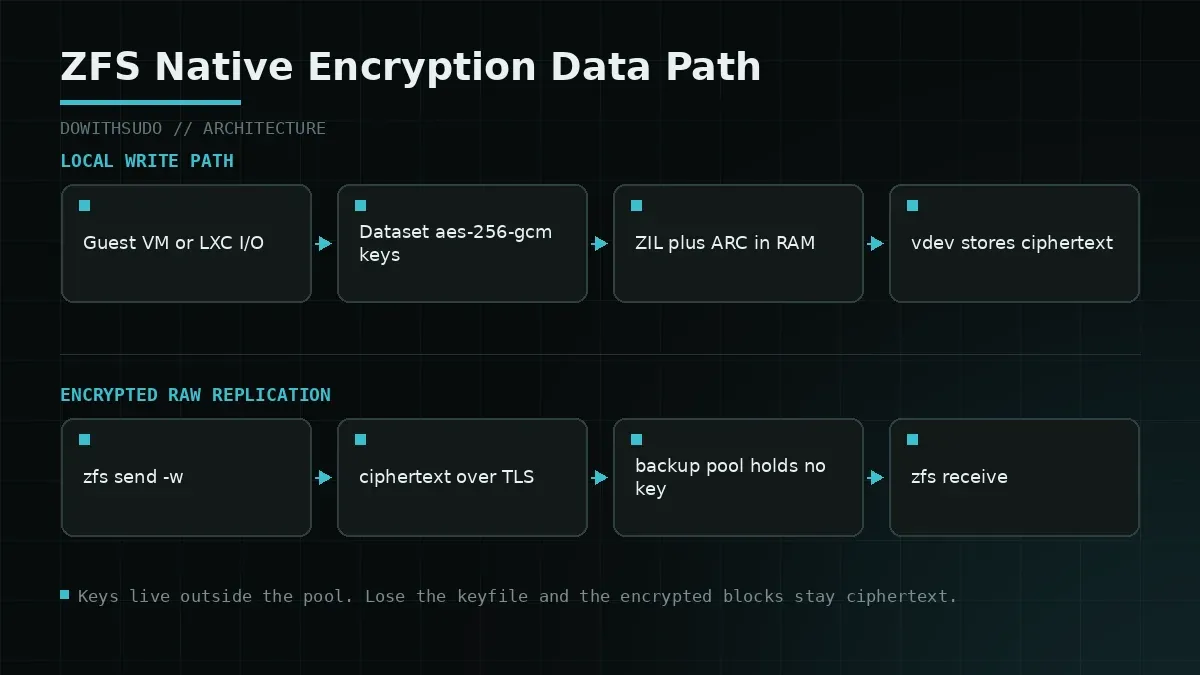
The second advantage is replication. zfs send can transmit an encrypted stream without decrypting it on the source or the destination. The receiving side stores ciphertext it cannot read, which is exactly what you want from a backup host in a different trust zone. Compare that with LUKS, where a replication job either has access to the unlocked block device or has nothing to send.
| Property | LUKS2 block encryption | ZFS native dataset encryption |
|---|---|---|
| Granularity | One block device | Per dataset, per guest |
| Key scope | Single volume key | Per dataset key wrap |
| Selective unlock | Not practical | Per dataset zfs load-key |
| Encrypted replication | Requires unlocked source | zfs send -w sends ciphertext |
| Snapshot encryption | Inherits device state | Snapshot keeps its dataset key |
| CPU cost | AES-XTS on block layer | AES-GCM with AES-NI offload |
ZFS uses AES-256-GCM by default since OpenZFS 0.8, and with AES-NI available on any modern Xeon or EPYC the throughput cost stays in the low single digit percentage range for guest workloads. I measured roughly 4 to 6 percent read throughput loss on sequential 1 MB I/O with a Ryzen 5950X test node, which is noise for VM boot storms and noisier for synthetic benchmarks.
Key Formats: Passphrase, Raw Keyfile, and File Keys
ZFS supports three key sources on creation. Pick deliberately, because changing the key source later means re-keying, which means a full re-encryption pass over the dataset.
keyformat=passphraseasks a human to type a string. Convenient for laptops and single-node homelabs that shut down for months at a time.keyformat=rawaccepts 32 bytes of raw binary from a file. No KDF loop, no interactive prompt, fast to load.keyformat=hextakes 64 hex characters, which is raw in text clothing. I use it only when a CI system generates keys as printable strings.
The raw format earns its place in a server fleet for one reason. A systemd unit or a remote key server can pipe those bytes into zfs load-key at boot, and the load completes in milliseconds. Passphrase loading runs the PBKDF2 loop every single time, and with the default iteration count that is a measurable delay per dataset on a host with twenty guests.
Where do the key bytes live? Three realistic options.
- A file on the hypervisor root filesystem, protected by filesystem permissions and an encrypted root.
- A remote key endpoint reached over the network, typically a Tang server for Clevis or an internal HTTP key service behind mutual TLS.
- A TPM2 sealed blob bound to the host, with Clevis doing the unsealing.
Option 1 is honest about its limits. If the host is stolen whole, the key travels with the data. Options 2 and 3 split the key from the storage medium, at the cost of a network dependency during boot.
Step 1: Create the Pool and an Encrypted Dataset
The examples assume a fresh NVMe device at /dev/nvme1n1 and a pool named tank. Back up anything on the target device before you continue.
# Create the pool without any encryption at the pool root.
zpool create -o ashift=12 tank /dev/nvme1n1

# Generate 32 bytes of raw key material.
install -d -m 700 /etc/zfs/keys
dd if=/dev/urandom of=/etc/zfs/keys/billing.key bs=32 count=1 status=none
chmod 400 /etc/zfs/keys/billing.key

# Create the encrypted dataset with the raw keyfile.
zfs create -o encryption=aes-256-gcm \
           -o keyformat=raw \
           -o keylocation=file:///etc/zfs/keys/billing.key \
           tank/guests
Verify the result before you put a single guest disk on it.
zfs get encryption,keyformat,keylocation,keystatus,encryptionroot tank/guestsNAME PROPERTY VALUE SOURCE
tank/guests encryption aes-256-gcm -
tank/guests keyformat raw -
tank/guests keylocation file:///etc/zfs/keys/billing.key local
tank/guests keystatus available -
tank/guests encryptionroot tank/guests -Child datasets created under tank/guests inherit encryption and, by default, the same key unless you pass a new keylocation. That inheritance is a trap I will come back to in the troubleshooting section.
Step 2: Load the Key Automatically at Boot
An encrypted dataset with keystatus=unavailable cannot be mounted. On a Proxmox node, that means guests on that dataset do not start and a boot that looks healthy in the logs quietly leaves half your fleet down.
For a local key file, a small systemd unit is enough. It must run after ZFS imports the pool and before anything tries to mount the dataset.
# /etc/systemd/system/zfs-load-key-billing.service
[Unit]
Description=Load ZFS keys for encrypted guest datasets
DefaultDependencies=no
Before=zfs-mount.service
After=zfs-import.target
Requires=zfs-import.target

[Service]
Type=oneshot
RemainAfterExit=yes
ExecStart=/usr/sbin/zfs load-key -a
ExecStartPost=/usr/sbin/zfs mount -a

[Install]
WantedBy=zfs-mount.service
systemctl daemon-reload
systemctl enable zfs-load-key-billing.service
systemctl start zfs-load-key-billing.service
zfs mount | grep tankWhen the key lives on another host, do not hardcode an HTTP fetch into the unit without timeouts and a bounded retry. A boot that hangs forever on an unreachable key server is worse than a boot that fails fast. This is the shape I use for a Clevis and Tang setup on Debian 12 and Proxmox VE 8.
apt install clevis clevis-systemd clevis-initramfs
# Bind the key blob to a Tang server, then store it on the dataset keylocation.
clevis encrypt tang '{"url":"http://tang.internal:7500"}' \
  -y > /etc/zfs/keys/billing.jwe
zfs set keylocation=file:///etc/zfs/keys/billing.jwe tank/guests
clevis luks bind -d /dev/nvme1n1 tang '{"url":"http://tang.internal:7500"}'
Tang gives you a threshold property that a plain keyfile never has. The key material is derived from the Tang server plus the local encrypted blob, so a stolen disk alone cannot be unlocked. The tradeoff is that a stolen disk plus a reachable Tang server can be, which means your Tang server needs to live on a network that a stolen laptop cannot reach.
Test the boot path with the key server deliberately offline. If the host cannot start its guests without a network dependency that you never rehearsed, you have a schedule to keep instead of a plan.
Step 3: Encrypted Replication with zfs send -w
The -w flag sends raw encrypted blocks. The receiving side writes them down without a key, and zfs receive on an encrypted dataset of the same type recreates the encryption root.
# On the source, snapshot the dataset.
zfs snapshot tank/guests@nightly-2026-09-21

# Stream the encrypted snapshot to a backup pool over SSH.
zfs send -w tank/guests@nightly-2026-09-21 \
  | ssh backup01.internal zfs receive -u -F backup/tank/guests

# If the remote dataset does not exist yet, create it with matching properties first.
ssh backup01.internal zfs create -o encryption=on -o keyformat=raw \
  -o keylocation=file:///etc/zfs/keys/billing.key backup/tank/guests
Two rules keep this safe. First, the receive side needs -u only when you genuinely want to skip mounting, since mounting an encrypted dataset without a key will fail the receive. Second, never mix a raw stream into a pool that stores plaintext anywhere on the path, because the bytes you are shipping are the same ciphertext that sits on the source vdevs.
The operational payoff shows up in the backup host’s threat model. The Proxmox Backup Server sitting in another rack holds ciphertext it cannot read, and a compromise of that host does not expose guest data. Our hardening checklist for that server is covered in the Proxmox Backup Server hardening guide, which pairs naturally with this setup at backup server hardening.
Failure Modes, Pitfalls, and Recovery
Three problems account for most of the tickets I have seen around ZFS encryption on Proxmox.
1. Dataset unavailable after reboot because the key unit failed
Symptom: zfs list shows the dataset, zfs get keystatus shows unavailable, and every guest on it fails to start with a missing disk image.
zfs get keystatus tank/guests
systemctl status zfs-load-key-billing.service --no-pager
journalctl -u zfs-load-key-billing.service -n 40 --no-pager
zfs load-key tank/guests
zfs mount tank/guests
If the load fails with Key load error: Invalid key format, the file at keylocation is not raw 32 bytes. Check the size, not just the presence. A trailing newline from echo instead of printf or dd is the classic cause.
2. A child dataset silently reused the parent key
Because children inherit encryptionroot, creating tank/guests/billing without a new keylocation ties the child to the parent key. Destroying the intent to keep per-guest isolation, you end up with one key controlling twenty guests. Audit inheritance regularly.
zfs get -r encryption,keylocation,encryptionroot tank | grep -v inheritedAnything reporting encryptionroot tank/guests when you expected a per-guest root needs zfs change-key -o keylocation=file:///etc/zfs/keys/<guest>.key followed by a re-encryption of the affected snapshots.
3. Replication fails with a raw stream into a plaintext target
Symptom: zfs receive exits with cannot receive new filesystem stream: destination does not match source encryption.
zfs get encryption,keyformat backup/tank/guestsFix it by recreating the target dataset with encryption=on and the same keyformat, then resending. If the message instead mentions keylocation, the target already holds a key for that dataset and you are trying to overwrite it with -F while the old key is still cached. Unload the target key first with zfs unload-key and retry.
One more habit that saves time. Record the SHA-256 of every keyfile in your CMDB, not in the same directory as the key. If a keyfile and its checksum both disappear with a failed disk, you will want the checksum to prove which backup archive holds the original.
Production Verification Checklist
Run this after any change to encryption properties, and again after every hypervisor upgrade.
| Check | Command | Expected |
|---|---|---|
| Dataset encrypted | zfs get -r encryption tank | aes-256-gcm on guest roots |
| Key loaded | zfs get keystatus tank/guests | available |
| Boot unit enabled | systemctl is-enabled zfs-load-key-billing | enabled |
| Key file permissions | stat -c '%a %U' /etc/zfs/keys/*.key | 400 root |
| Key bytes are raw | wc -c /etc/zfs/keys/billing.key | 32 |
| Replication stream raw | zfs send -n -v -w tank/guests@snap | raw encrypted in output |
| Guest disk header | zfs get encryption <zvol> | inherits encrypted root |
| Recovery documented | grep -r load-key /etc/zfs/ | scripted, tested |
The last row matters more than the others. A runbook that says “load the key” without a tested path from a cold boot is a guess. I rehearse the drill by unloading the key on a canary VM’s dataset during a maintenance window and confirming the guest starts again.
Closing Thoughts
Encryption at the hypervisor layer protects the machine. Encryption at the dataset layer protects the data, wherever it travels and whoever eventually owns the disks. If you are already running ZFS on Proxmox, the storage architecture choices that make this practical are covered in our comparison of ZFS, Ceph, and LVM-Thin, and if you are still deciding between filesystems on the host itself, the trade-offs live in ZFS vs Btrfs on Linux.
Start with one dataset that holds the data you would least like to see in someone else’s rack. Encrypt it, load the key from a script, restore one guest from an encrypted snapshot, and write down the four commands that made it work. Four commands you have actually run beat a policy document every time a chassis leaves the building.
Implementation Checklist
- Replicate the steps in a controlled lab before production changes.
- Document configs, versions, and rollback steps.
- Set monitoring + alerts for the components you changed.
- Review access permissions and least-privilege policies.
Official References
Need a Hand?
If you want this implemented safely in production, I can help with assessment, execution, and hardening.
Contact MeNeed an Offsite Backup Node or Corosync QDevice?
Deploy an independent cloud Droplet to act as a lightweight Corosync QDevice tiebreaker, remote PBS backup sync relay, or isolated test environment with $200 in free credits.
Transparency: We independently test and operate all recommended infrastructure. If you use our partner links, you receive free promotional credits and support our testing lab at zero extra cost to you.
Weekly Production DevOps Runbooks
Join 1,000+ infrastructure engineers receiving real-world Linux troubleshooting, Proxmox clustering setups, and Docker optimization runbooks every Tuesday. Zero spam, unsubscribe anytime.

About the Author
Kamandanu Wijaya
IT Infrastructure & Network Administrator
Infrastructure & network administrator with 15+ years of enterprise experience, focused on stability, security, and automation.
Certifications: Google IT Support, Cisco Networking Academy, DevOps.
How to Replace a Degraded Hard Drive in a ZFS Storage Pool
next →Proxmox Mail Gateway Setup for Inbound Email Spam Defense
Need IT Solutions?
DoWithSudo is ready to help setup servers, VPS, and your security systems.
Contact Us