Proxmox Mail Gateway Setup for Inbound Email Spam Defense

A 40 person company called on a Tuesday because their mail server had been unusable since the weekend. The mailbox server was a single VM with Postfix, Dovecot, and SpamAssassin on the same host, and it had spent three days processing roughly 5,200 inbound messages per day, of which about 4,900 were spam and phishing attempts. The queue had grown to 61,000 messages, the disk was at 96 percent, and legitimate invoices were bouncing with 452 4.3.1 Insufficient system storage.
The root cause was not spam volume, which is normal for any domain with a public MX record. It was placement. Filtering on the same host that stores mailboxes means every spam message consumes CPU, disk, and queue space on the system that must stay available for legitimate mail. When it fell behind, it fell behind for everyone.
Proxmox Mail Gateway puts a dedicated filtering relay in front of the mailbox server. It absorbs the traffic, scores it, quarantines what it rejects, and forwards only what passes. This article covers the deployment from MX records to DKIM signing, plus the failure modes that matter when email is the business.
Where the Gateway Sits in the Mail Flow
An inbound filtering proxy is a simple idea with useful consequences. The public MX record points at the gateway instead of the mailbox server. The gateway accepts the SMTP connection, runs its checks, then relays accepted mail to the internal server over a trusted network. The mailbox server never accepts a connection from the internet, and it never spends a cycle on a message that scored as spam.
Three properties come out of that arrangement.
- The mailbox server can sit behind a firewall with port 25 closed to the world, which removes an entire attack surface.
- Quarantine storage lives on a host that only holds quarantine, so a spam flood cannot fill the disk that stores invoices.
- The gateway becomes the single place where policy is written, which is far easier to audit than rules spread across two servers.
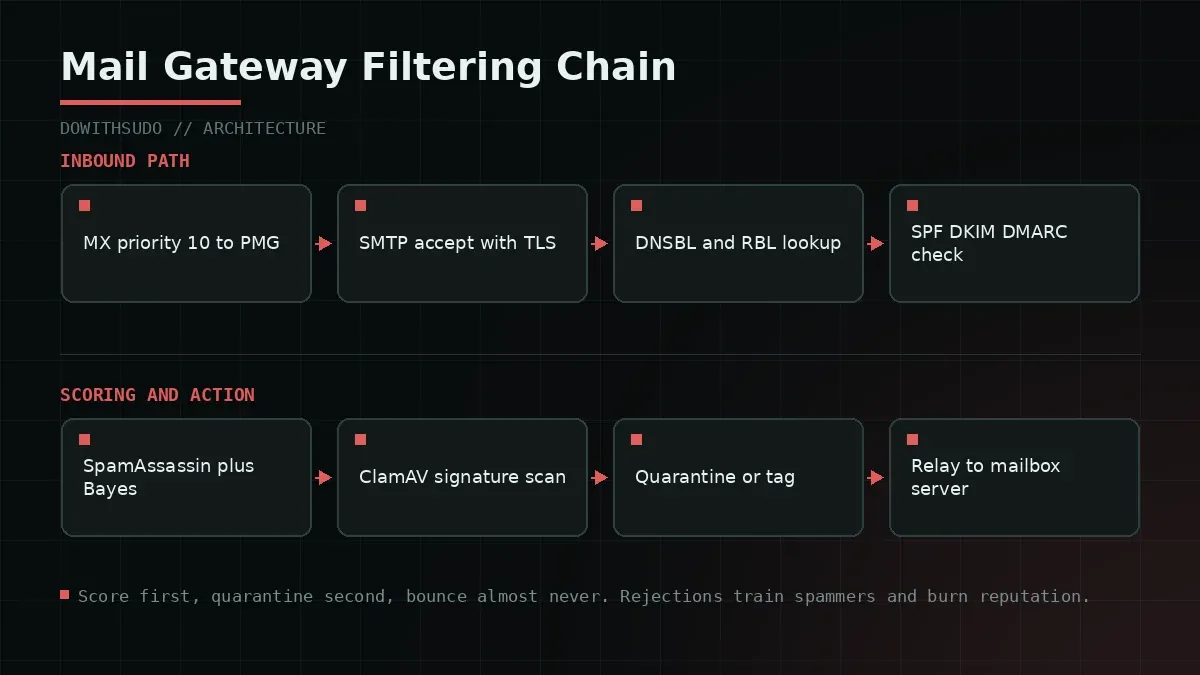
The relay decision table below is the mental model to keep. Every message passes through these stages in order, and the action is what the gateway does when a stage produces a verdict.
| Stage | Check | Typical action |
|---|---|---|
| Connection | DNSBL and RBL lookup | Reject at SMTP time |
| Session | Greylisting and rate limits | Temporary defer |
| Authentication | SPF, DKIM, DMARC | Tag or reject per policy |
| Content | SpamAssassin score | Quarantine, tag, or deliver |
| Attachment | ClamAV signature scan | Quarantine and notify |
| Delivery | Relay to mailbox server | Forward over trusted network |
Step 1: Install the Gateway and Move Your MX Records
Install Proxmox Mail Gateway on a dedicated host or VM with at least 2 vCPU, 4 GB of RAM, and 32 GB of disk for a small organisation. ClamAV signature databases and quarantine storage grow faster than people plan for, so size the disk generously and monitor it.
# On a Debian 12 base install, using the Proxmox repository.
echo "deb [signed-by=/usr/share/keyrings/proxmox-archive-keyring.gpg] \
http://download.proxmox.com/debian/pmg bookworm pmg-no-subscription" \
  > /etc/apt/sources.list.d/pmg.list
apt update && apt install -y proxmox-mailgateway
Before touching DNS, confirm two reverse lookup details, because they decide whether large providers will talk to you at all.
dig +short mx dowithsudo.com
dig +short -x 203.0.113.20
The forward and reverse names must match, and the PTR record must point at the gateway’s hostname rather than at your ISP’s generic name. A mismatch produces deferrals from Microsoft and Google that look like content filtering but are reputation problems. The mechanics of verifying those records are covered in our walkthrough on how to check MX records, and the same interactive checks exist in the MX record tool if you want a browser based confirmation.
Then publish the MX records with the gateway at the lowest priority number and keep the old mailbox server as a higher numbered backup during the transition.
dowithsudo.com.    IN MX 10  mailgateway.dowithsudo.com.
dowithsudo.com.    IN MX 20  mailbox.dowithsudo.com.
Wait for propagation, then confirm with a lookup from an external resolver rather than from the gateway itself, because a local resolver will happily return a cached answer that hides the change.
Step 2: Define Relay Domains and Transports
In the PMG interface under Configuration, Mail Proxy, define which domains you accept mail for and where it goes. Getting this wrong in the permissive direction creates an open relay, which is the single fastest way to end up on a blocklist.
# Configuration, Mail Proxy, Relay Domains
dowithsudo.com    relay
clientdomain.example  relay
# Configuration, Mail Proxy, Transports
dowithsudo.com smtp:[10.30.0.25]:25
clientdomain.example smtp:[10.30.0.40]:25# Configuration, Mail Proxy, Options worth reviewing
smtpd_tls_security_level = may
smtpd_tls_cert_file = /etc/pmg/pmg-tls.pem
smtpd_recipient_restrictions = reject_unauth_destination
trusted_networks = 10.30.0.0/24Two settings in that list carry disproportionate risk. reject_unauth_destination must be present, because without it Postfix will relay mail for any recipient domain it can resolve. The trusted networks list must contain only the internal networks that legitimately send outbound mail through the gateway, because everything inside that list bypasses authentication checks.
Verify the relay behaviour from an external host before you change any MX record, because a relay that accepts arbitrary recipients will be found by scanners within hours.
# Expect a 554 relay access denied for a domain you do not own.
swaks --to random@not-your-domain.com --server mailgateway.dowithsudo.com
<- 554 5.7.1 <random@not-your-domain.com>: Relay access deniedStep 3: Tune SpamAssassin, DNSBL, and Authentication Checks
The default configuration is reasonable and tuned for a general audience. Two adjustments make it fit a specific organisation: the score thresholds, and which DNSBL zones you query.
# Configuration, Spam Detector, Options
Spam score threshold      = 3
Tag level                 = 2
Quarantine threshold      = 5
# Score 5 or higher is quarantined, 2 to 5 is tagged in the subject,
# and anything below 2 is delivered untouched.
# Configuration, Spam Detector, DNSBL zones (one per line)
zen.spamhaus.org
bl.spamcop.net
b.barracudacentral.org
dnsbl.sorbs.netSpamhaus and Barracuda do the heavy lifting for a normal inbox. Adding eight zones instead of four catches marginally more spam and increases the false positive rate, because each additional list has its own error profile. I keep four and review the quarantine daily for the first month.
Authentication results deserve strict handling. A domain that publishes a DMARC policy of reject and whose mail fails SPF and DKIM is either misconfigured or spoofed, and both cases warrant rejection at SMTP time.
# Configuration, Mail Proxy, Options
SPF checking              = 1 (reject on fail)
DKIM verification         = 1
DMARC enforcement         = 1
Bayesian learning is what makes a filter feel trained to your organisation. PMG ships with the ability to feed ham and spam examples into the Bayes database, and the quarantine interface is the easiest place to do it. Mark one hundred legitimate messages as ham in the first week and one hundred clear spam as spam, then repeat monthly. The score distribution shifts noticeably after about two hundred examples per class.
Greylisting is the other high value control, and it is also the most common source of complaints. It defers mail from an unseen sender and server combination for a few minutes, which kills a large fraction of cheap botnet spam. The cost is that badly behaved senders do not retry, and a legitimate mailing list relay that never retries will simply never deliver.
# Configuration, Mail Proxy, Greylisting
Enable greylisting        = 1
Greylisting delay         = 300 seconds
Greylisting whitelist     = 10.30.0.0/24, mailchimp.com, sendgrid.net
Whitelist the senders whose deliverability matters before enabling greylisting, not after the marketing team notices that campaign mail stopped arriving. That list belongs in version control alongside the rest of the configuration.
Step 4: ClamAV and Signature Hygiene
Antivirus scanning is what stops an invoice themed attachment from reaching a mailbox, and it needs the signature database to stay current. Check the update service first, because a stale database gives a false sense of security.
systemctl status clamav-freshclam --no-pager
freshclam --version
ls -l /var/lib/clamav/*.cvd /var/lib/clamav/*.cld 2>/dev/null | tail -3
-rw-r--r-- 1 clamav clamav 283147264 Sep 22 04:12 main.cvd
-rw-r--r-- 1 clamav clamav 52811872 Sep 22 04:12 daily.cldBoth files should carry today’s date. If daily.cld is more than two days old, the update service is failing and every new signature is missing. The usual causes are a full disk, an outbound proxy blocking port 80, or a ClamAV process killed by the kernel for using too much memory on a small VM.
journalctl -u clamav-freshclam -n 30 --no-pager
df -h /var/lib/clamav
free -m
On a 2 GB VM, give ClamAV at least 2 GB of memory headroom and expect a signature update to spike CPU for a minute. If the host is smaller than that, move the gateway to a bigger instance rather than disabling scanning, and consider scanning only certain attachment types if throughput becomes a bottleneck.
Step 5: DKIM Signing and Quarantine Digests
Inbound filtering protects your users. Outbound signing protects your domain reputation, and it matters just as much for deliverability as the inbound rules do.
# Generate a selector key on the gateway.
mkdir -p /etc/pmg/dkim
openssl genrsa -out /etc/pmg/dkim/selector2026.key 2048
openssl rsa -in /etc/pmg/dkim/selector2026.key -pubout -out /etc/pmg/dkim/selector2026.pub
chmod 400 /etc/pmg/dkim/selector2026.key
Register the domain under Configuration, Mail Proxy, DKIM, point it at the key, then publish the public key as a TXT record.
selector2026._domainkey.dowithsudo.com. IN TXT (
  "v=DKIM1; k=rsa; p=MIIBIjANBgkqhkiG9w0BAQEFAAOCAQ8A..."
)
Verify the published record matches the key you generated, because a truncated TXT record is the most common reason signatures fail validation at the receiving end.
dig +short TXT selector2026._domainkey.dowithsudo.com | head -2
opendkim-testkey -d dowithsudo.com -s selector2026 -k /etc/pmg/dkim/selector2026.key -vv
Quarantine digests are the user facing half of the system. Configure the daily summary under Configuration, Spam Detector, Quarantine so recipients can release a false positive themselves, and enable self service so they can also whitelist a sender.
# Configuration, Spam Detector, Quarantine
Quarantine retention      = 30 days
Send daily digest         = 1
Digest time               = 06:00
User self service         = 1
The digest time matters more than it looks. A digest sent at 18:00 lands after the workday and gets ignored, which means legitimate mail sits in quarantine overnight. Early morning delivery gives users a chance to release it before their first meeting.
Quarantine is a user interface for spam, and a filter with no release path trains people to distrust the filter.
Failure Modes and Troubleshooting
1. The gateway becomes an open relay
Symptom: your domain appears on a blocklist, and journalctl -u postfix shows outbound deliveries to recipients you do not recognise.
grep -E 'mynetworks|relay_domains' /etc/postfix/main.cf
tail -200 /var/log/mail.log | grep 'to=<' | grep -v 'dowithsudo.com' | head -20
postqueue -p | grep -c '^[A-F0-9]'
Check mynetworks first, because an overly broad entry such as 0.0.0.0/0 turns the relay into an open one. Restrict it to the internal networks, keep reject_unauth_destination in the recipient restrictions, and rotate any SMTP credentials that may have leaked. Removing yourself from a blocklist takes days, so treat this as an incident with a clock on it.
2. Legitimate mail is quarantined as spam
Symptom: invoices and password reset emails from a known provider land in quarantine every day.
grep -i 'X-Spam-Status' /var/log/mail.log | tail -5
pmgsh get /quarantine/spam --limit 20
Read the score breakdown in the message headers. A message scoring 6 with RCVD_IN_DNSWL and SPF_FAIL is a policy problem rather than a content problem, and the fix is adding the sender to the whitelist or relaxing the SPF rule for a known forwarder. Do not raise the global threshold to fix a single sender, because that removes protection for everything else.
3. ClamAV is killed during signature updates
Symptom: journalctl -k reports an out of memory kill targeting a clamd process, and scanning stops until the service restarts.
journalctl -k --since '24 hours ago' | grep -i 'killed process'
systemctl status clamav-daemon --no-pager
grep -i 'MaxThreads\|ConcurrentDatabaseReload' /etc/clamav/clamd.conf
Reduce MaxThreads to 4, set ConcurrentDatabaseReload no, and give the VM more memory. Reloading the database while scanning under a memory constrained VM is what pushes the process over the limit.
4. DKIM signatures fail at the recipient
Symptom: messages arrive with dkim=fail in the Authentication-Results header at the destination.
dig +short TXT selector2026._domainkey.dowithsudo.com | tr -d '"' | wc -c
opendkim-testkey -d dowithsudo.com -s selector2026 -vv
A signature fails for three reasons in practice: the public key does not match, something between the gateway and the recipient modified a header that the signature covers, or the selector record is missing from DNS. Check the record length first, since many DNS providers silently split long TXT values into chunks that some resolvers reassemble incorrectly. If your outbound path includes a provider that rewrites links, exclude DKIM signing for those domains or turn off the rewriting.
Verification Checklist
| Check | Command or location | Expected |
|---|---|---|
| MX points at gateway | dig +short mx dowithsudo.com | Priority 10 to PMG |
| Reverse DNS matches | dig +short -x <gateway-ip> | Gateway hostname |
| No open relay | swaks --to random@not-your-domain.com | 554 Relay access denied |
| Trusted networks narrow | grep trusted /etc/pmg/pmg.conf | Internal ranges only |
| Spam thresholds set | PMG interface, Spam Detector | Threshold 3, quarantine 5 |
| DNSBL zones active | PMG interface, DNSBL | Four curated zones |
| Greylisting whitelist | PMG interface | Known senders listed |
| ClamAV current | ls -l /var/lib/clamav/daily.cld | Updated today |
| DKIM record published | dig +short TXT selector._domainkey... | Full public key |
| Digests delivered | PMG interface, Quarantine | Daily at 06:00 |
| Queue near empty | postqueue -p | Under 50 messages |
The queue length check is the one I run during every incident. A queue that grows during business hours means the relay is blocked, and a blocked relay means mail is bouncing at the sender, where you cannot see it. The gateway host also deserves the same patching discipline as the rest of your infrastructure, which is what the Proxmox CVE and patching guide covers, and keeping the management interface off the public internet is worth doing on day one rather than after a scan finds it.
Closing Thoughts
Filtering belongs on a host that exists to filter, not on the one that stores everyone’s mail. Moving from a single combined mail server to a dedicated gateway turned a recurring weekend emergency into a system that runs for months without attention, and it gave the mailbox server a firewall rule set I can explain in one sentence: accept mail from the gateway, accept nothing else.
If you are planning the change, the sequence that avoids downtime is to stand the gateway up, verify the relay and the reverse DNS, publish it as a higher priority MX record first, and only then promote it to priority 10. That way you test it with real senders while the mailbox server is still receiving directly. When the promotion happens, keep the old record at priority 20 for a week. Mail delivery is a system where the failure appears twenty minutes later at a third party, so build in the window to notice.
Implementation Checklist
- Replicate the steps in a controlled lab before production changes.
- Document configs, versions, and rollback steps.
- Set monitoring + alerts for the components you changed.
- Review access permissions and least-privilege policies.
Official References
Need a Hand?
If you want this implemented safely in production, I can help with assessment, execution, and hardening.
Contact MeNeed an Offsite Backup Node or Corosync QDevice?
Deploy an independent cloud Droplet to act as a lightweight Corosync QDevice tiebreaker, remote PBS backup sync relay, or isolated test environment with $200 in free credits.
Transparency: We independently test and operate all recommended infrastructure. If you use our partner links, you receive free promotional credits and support our testing lab at zero extra cost to you.
Weekly Production DevOps Runbooks
Join 1,000+ infrastructure engineers receiving real-world Linux troubleshooting, Proxmox clustering setups, and Docker optimization runbooks every Tuesday. Zero spam, unsubscribe anytime.

About the Author
Kamandanu Wijaya
IT Infrastructure & Network Administrator
Infrastructure & network administrator with 15+ years of enterprise experience, focused on stability, security, and automation.
Certifications: Google IT Support, Cisco Networking Academy, DevOps.
Proxmox ZFS Native Encryption: Setup, Keyload, and Unlock
next →Proxmox PCIe GPU Passthrough Guide for Local LLM Workloads
Need IT Solutions?
DoWithSudo is ready to help setup servers, VPS, and your security systems.
Contact Us