Proxmox SDN and Firewall Rules for Strict Virtual Network
[ info ] // Meta
Category
SecurityAn attacker got a shell in a staging WordPress VM on a client cluster because a plugin had not been updated in nine months. That happens. What should not have happened is what came next. From inside that staging VM, a port scanner covered the entire 10.20.30.0/24 range in under ninety seconds and found PostgreSQL on port 5432, Redis on 6379, and the Proxmox API on 8006, all reachable, all on the same flat bridge.
The cluster had a firewall service. It was installed, enabled on two nodes out of three, and configured with a handful of rules that allowed traffic from the office subnet to everything. Nobody had ever defined what should be denied, because on a flat bridge everything is reachable by default and the rules only mattered when something broke.
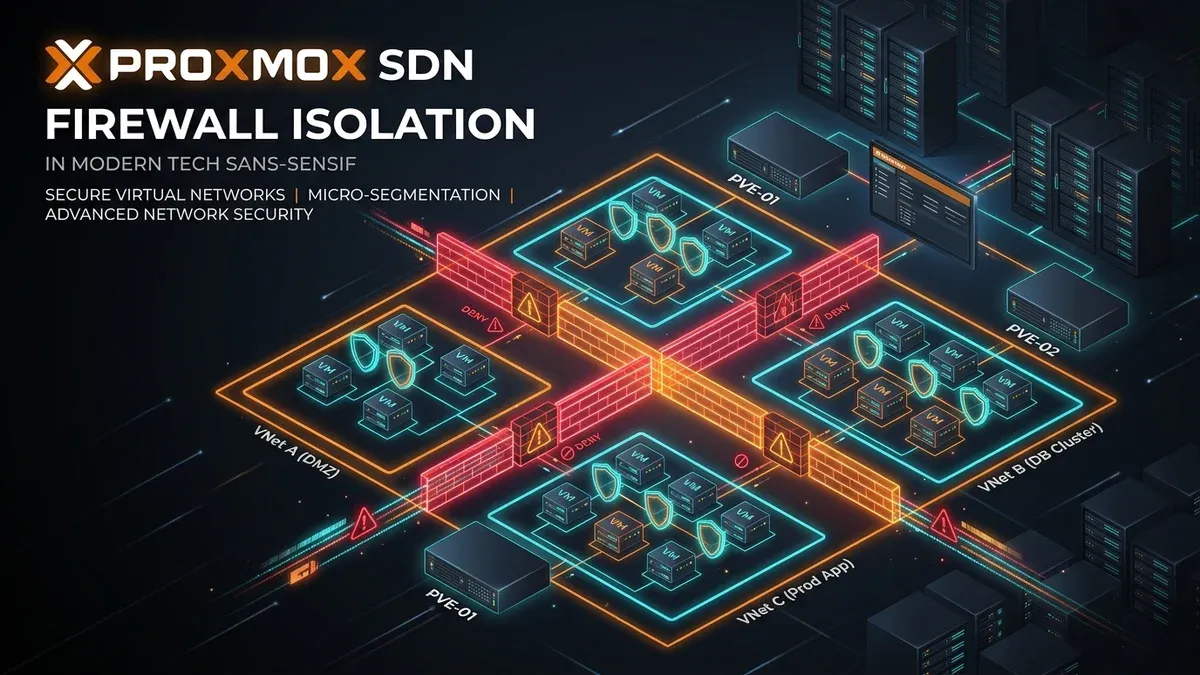
Strict isolation on Proxmox is a two part exercise. You need network separation so that a compromised guest is not on the same broadcast domain as your database, and you need a default deny firewall so that separation is enforced even when someone misconfigures an interface. This article walks through both, using SDN zones and VNets for segmentation, then the built-in firewall hierarchy for enforcement.
How Proxmox SDN Layers on Linux Bridges
Traffic on a default Proxmox node goes through vmbr0, a Linux bridge that behaves like a physical switch. Every VM interface attached to it is in one broadcast domain, and isolation depends entirely on the guest’s own firewall. That is fine for three trusted VMs and untenable for twenty, especially when some of them are staging environments exposed to the internet.
Software Defined Networking in Proxmox VE replaces per guest bridge configuration with declarative objects.
- A zone defines the isolation technology. A Simple zone is a local bridge with optional VLAN awareness, a VLAN zone maps guests to tags on an existing bridge, and an EVPN zone builds a VXLAN overlay across nodes with BGP control plane via FRR.
- A VNet is a virtual network inside a zone. Guests attach to a VNet instead of a bridge, and the VNet provides the bridge and any VLAN or VXLAN encapsulation.
- Subnets attach IP ranges to a VNet so the SDN controller can hand out addresses and generate routing.
The practical benefit is that a guest’s network becomes a property in the cluster configuration rather than a bridge name, and a change to a zone propagates across nodes when you press Apply instead of when you remember to edit interfaces on each host.
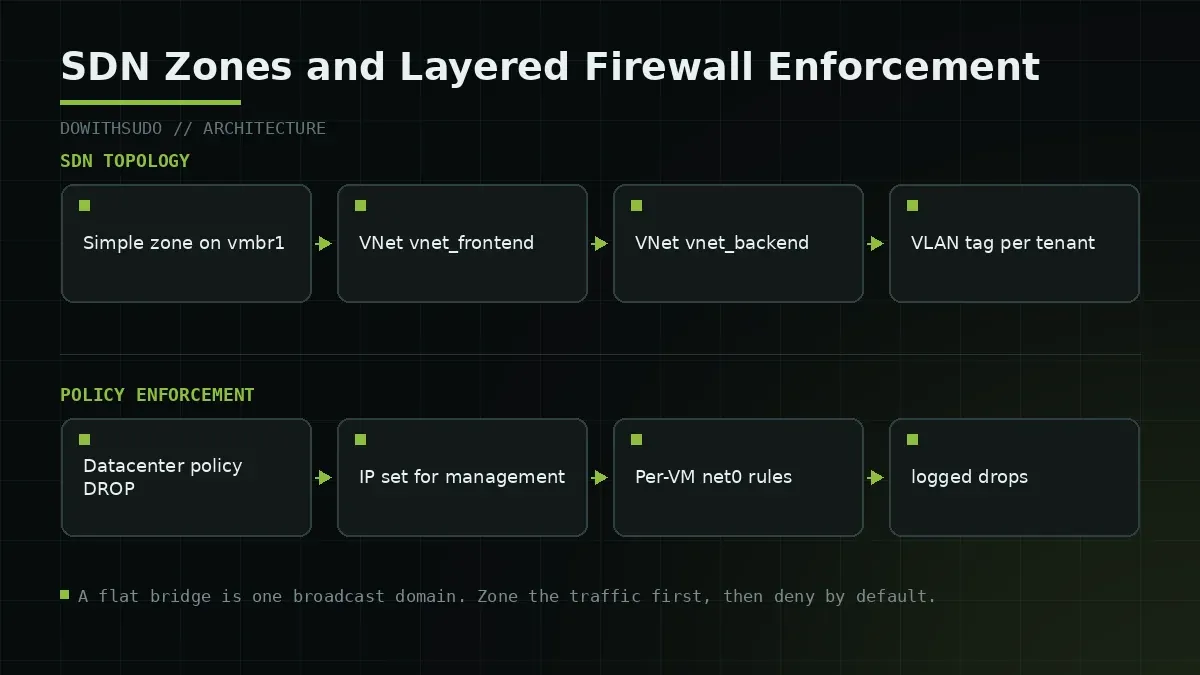
The firewall is separate from all of this. Proxmox ships a filtered bridge implementation where each guest interface gets its own rule chain, and rules are evaluated in a hierarchy from datacenter down to the individual network interface.
| Level | File or location | Scope | Typical use |
|---|---|---|---|
| Datacenter | cluster.fw | Whole cluster | Baseline deny, management IP set |
| Security group | cluster.fw | Reusable rule set | Web tier, database tier templates |
| Node | host.fw | One physical host | Host services and migration ports |
| VM or container | <vmid>.fw | One guest | Ingress and egress per service |
| Network interface | Guest option | One NIC | Bridge level filtering, MAC filter |
Rules at a lower level do not replace the ones above them. They add to the chain, which means a permissive rule at the datacenter level cannot be undone by a restrictive rule on a single VM. The consequence is that your baseline must be restrictive from the start. Adding deny rules later means auditing every rule above them.
Step 1: Create a Zone and Two VNets
The plan for this example is three networks. A management network for the Proxmox UI and node traffic, a frontend network for VMs that face users, and a backend network for databases and internal APIs. Start with a Simple zone, which works on a single node and does not require FRR or an EVPN controller.
# Inspect existing SDN configuration.
cat /etc/pve/sdn/zones.cfg 2>/dev/null || echo "no zones yet"
cat /etc/pve/sdn/vnets.cfg 2>/dev/null || echo "no vnets yet"
Create the zone and VNets either from the web interface under Datacenter, SDN, or by writing the configuration files directly. Writing files is faster to script and easier to review.
# /etc/pve/sdn/zones.cfg
simple: izn
    bridge vmbr1
    mtu 1500
    ipam pve
    dns 1.1.1.1
# /etc/pve/sdn/vnets.cfg
vnet: vnet_frontend
zone izn
alias Frontend
vnet: vnet_backend
zone izn
alias Backend
vnet: vnet_mgmt
zone izn
alias Management# Attach a subnet to the backend VNet, then apply the pending configuration.
cat >> /etc/pve/sdn/subnets.cfg <<'EOF'
subnet: izn-10.30.0.0-24
vnet vnet_backend
gateway 10.30.0.1
snat 1
EOF
pvesh set /cluster/sdn
pvesh get /cluster/sdn/vnets vnet_backend --output-format jsonpvesh set /cluster/sdn applies pending changes. Without it, your zone and VNet configuration exists in the SDN directory and does nothing, which is a source of much confusion. Note that snat 1 on the backend subnet gives guests outbound internet access through the node, which you may want to remove to keep an isolated tier truly isolated.
Step 2: Attach Guests to the Right VNet
Change each guest’s network device to reference the VNet. On the CLI this is a single argument, and the guest keeps its MAC address so DHCP leases and monitoring do not need updating.
qm set 301 --net0 virtio,bridge=vnet_frontend,firewall=1
qm set 401 --net0 virtio,bridge=vnet_backend,firewall=1
qm set 900 --net0 virtio,bridge=vnet_mgmt,firewall=1
The firewall=1 argument is the one people forget. The Proxmox firewall is disabled per network device by default, so a guest attached to a bridge with a perfect rule set will pass traffic unfiltered until this flag is set. Enable it on every NIC and confirm afterwards.
grep -r 'net0' /etc/pve/qemu-server/301.conf
grep -r 'net0' /etc/pve/lxc/900.conf
Containers need one extra consideration. An LXC container shares the host kernel and its interface shows up as a veth pair, so the same firewall chain applies, but a container with nesting=1 or a privileged profile can make assumptions about the interface that conflict with filtering. Check the container’s logs after enabling the firewall, because a misfiltered DNS query looks like a broken container rather than a firewall rule.
Step 3: Set Default Deny at the Datacenter Level
This is the step where a mistake can lock you out of the web interface, so read it fully before applying.
The datacenter input policy controls traffic to the host itself. The datacenter output policy controls traffic from the host. The guest policies live in the VM rule set. Set the input policy to DROP only if you have already created rules that permit the management ports you need.
# /etc/pve/firewall/cluster.fw
[OPTIONS]
enable: 1
policy_in: DROP
policy_out: ACCEPT
log_level_in: nolog
log_level_out: nolog

[ALIASES]
admin_workstation 203.0.113.45
office_lan 10.20.30.0/24

[IPSET management]
203.0.113.45
10.20.30.0/24

[RULES]
IN ACCEPT -source +management -p tcp -dport 8006 -log nolog
IN ACCEPT -source +management -p tcp -dport 22 -log nolog
IN ACCEPT -source +management -p tcp -dport 5900:5999 -log nolog
IN ACCEPT -source +management -p udp -dport 5405:5412 -log nolog
IN ACCEPT -source +management -p tcp -dport 3128 -log nolog
IN DROP -log warning
Read that rule set carefully, because it changes host reachability. Port 8006 is the web interface, 22 is SSH, 5900 to 5999 covers VNC consoles, 5405 to 5412 handles Corosync, and 3128 is the SPICE proxy. Omitting Corosync ports on a cluster will break quorum after the next reboot, and leaving them out of a maintenance window is how a working cluster becomes a split brain incident.
Apply with a rollback plan. The safe method is to add the rules first, verify you can still reach the interface from a second session, and only then set policy_in to DROP.
# From a second terminal, keep an SSH session open as a lifeline.
pve-firewall compile
pve-firewall status
iptables -S | grep -c PVEFW
If the interface becomes unreachable, the recovery path is a local console or a serial connection. On a VM you can also use the Proxmox console tab, because that traffic does not traverse the filtered path in the same way.
Step 4: Micro-Segment Guests with Security Groups
With a default deny baseline in place, define reusable rule sets for tiers and attach them to guests. This keeps a twenty VM cluster manageable, because you change a tier once instead of editing twenty guest files.
# /etc/pve/firewall/cluster.fw (continued)
[group web_tier]
IN ACCEPT -p tcp -dport 80 -log nolog
IN ACCEPT -p tcp -dport 443 -log nolog
IN ACCEPT -p tcp -dport 22 -source +management -log nolog
IN DROP -log warning

[group db_tier]
IN ACCEPT -p tcp -dport 5432 -source 10.31.0.0/24 -log nolog
IN ACCEPT -p tcp -dport 22 -source +management -log nolog
IN DROP -log warning

[group mgmt_tier]
IN ACCEPT -source +management -p tcp -dport 22 -log nolog
IN DROP -log warning
Per guest, the file then reads as a short list of group references and overrides.
# /etc/pve/firewall/401.fw
[OPTIONS]
enable: 1
policy_in: DROP
policy_out: ACCEPT
macfilter: 1
ipfilter: 1

[RULES]
GROUP db_tier
IN ACCEPT -p icmp -log nolog
Two options in that header deserve explanation. ipfilter: 1 turns on the anti-spoofing check, so a guest cannot send packets with a source address other than the one configured on its interface. macfilter: 1 does the same for the MAC address, which stops ARP spoofing from inside a compromised guest. Together they close the two easiest lateral movement techniques available to an attacker who already has code execution in a staging VM.
Traffic between guests on the same VNet is filtered only if both interfaces have the firewall enabled. Between different VNets, the routing decision happens on the node, and the datacenter rules apply. I prefer to keep tiers on separate VNets and treat inter tier traffic as routed traffic, because that puts it through a rule chain I can log and audit.
A flat network plus a good firewall is one misconfiguration away from being a flat network. Separate the tiers first, then filter what still has to talk.
Failure Modes and Troubleshooting
1. The whole cluster becomes unreachable after a firewall change
Symptom: the web interface stops responding on every node and SSH drops from your workstation.
# From a local console or serial session.
pve-firewall stop
pve-firewall status
Stopping the firewall service restores the previous behaviour immediately. Then examine journalctl -u pve-firewall -n 100 and iptables -S on the affected node, and compare the compiled rules with what you intended. Almost always the source IP set was wrong, the rule ordering put a drop before an accept, or Corosync ports were omitted.
2. Rules exist but nothing is filtered
Symptom: a guest that should be blocked still reaches the database, and iptables -S shows no chain for that VMID.
grep -H 'firewall' /etc/pve/qemu-server/*.conf
pve-firewall compile
iptables -S | grep PVEFW | head -20
The per NIC firewall flag is the usual culprit. Fix it with qm set <vmid> --net0 virtio,bridge=<bridge>,firewall=1 and recompile. Verify from inside the guest rather than trusting the configuration, because a rule set that looks right and a rule set that is loaded are different things.
3. SDN changes never take effect
Symptom: pvesh get /cluster/sdn/vnets lists your VNet, and no bridge named vnet_frontend exists on the node.
cat /etc/pve/sdn/.running 2>/dev/null
pvesh get /cluster/sdn --output-format json
ip link show | grep vnet
Pending SDN changes must be applied. Run pvesh set /cluster/sdn and check that the bridge appears. If the zone is EVPN and the apply fails, the error usually points to FRR configuration or a missing controller definition.
Verification Checklist
| Check | Command | Expected |
|---|---|---|
| Baseline policy | grep policy_in /etc/pve/firewall/cluster.fw | DROP |
| Management IP set | grep -A5 IPSET /etc/pve/firewall/cluster.fw | Admin and office ranges |
| Corosync ports open | grep dport /etc/pve/firewall/cluster.fw | 5405 to 5412 permitted |
| Firewall compiled | pve-firewall compile | No syntax errors |
| Chains present per guest | iptables -S | grep PVEFW | Entry per VM NIC |
| NIC filtering enabled | grep firewall=1 /etc/pve/qemu-server/*.conf | Every exposed NIC |
| Anti-spoofing on | grep -E 'ipfilter|macfilter' /etc/pve/firewall/*.fw | 1 on untrusted guests |
| SDN applied | ip link | grep vnet_ | Bridge for every VNet |
| Tiers on separate VNets | qm config <vmid> | grep net0 | No mixed tiers |
| Drop logging on | grep 'log warning' /etc/pve/firewall/cluster.fw | Present at least once |
The guest side of this work is only half of the isolation story. A hypervisor whose management plane is exposed is a different class of risk, and the hardening that belongs around it, including patching and interface exposure, is covered in our Proxmox CVE and patching guide and in the Linux server hardening baseline. The lateral movement patterns that motivated this article, including how a guest VM starts probing the hypervisor, are documented in the Proxmox guest VM isolation case study.
Closing Thoughts
Isolation is a design decision, not a product feature. Proxmox gives you the primitives, VNets for separation and a rule hierarchy for enforcement, and both are optional. The cluster in the opening story had every tool needed to prevent a staging VM from reaching production, and it had no default deny because nobody wanted to be the person who locked out the team.
My advice is to make the change in two steps rather than one. Create the VNets and move the sensitive tier onto a separate network first, so separation exists before enforcement begins. Then set the datacenter input policy to DROP with a keepalive SSH session open and management rules already tested. The staging VM in that incident scanned a flat network and found everything. Give the next one a network where the only thing it can reach is the internet and a logging endpoint.
Implementation Checklist
- Replicate the steps in a controlled lab before production changes.
- Document configs, versions, and rollback steps.
- Set monitoring + alerts for the components you changed.
- Review access permissions and least-privilege policies.
Official References
Need a Hand?
If you want this implemented safely in production, I can help with assessment, execution, and hardening.
Contact MeNeed an Offsite Backup Node or Corosync QDevice?
Deploy an independent cloud Droplet to act as a lightweight Corosync QDevice tiebreaker, remote PBS backup sync relay, or isolated test environment with $200 in free credits.
Transparency: We independently test and operate all recommended infrastructure. If you use our partner links, you receive free promotional credits and support our testing lab at zero extra cost to you.
Weekly Production DevOps Runbooks
Join 1,000+ infrastructure engineers receiving real-world Linux troubleshooting, Proxmox clustering setups, and Docker optimization runbooks every Tuesday. Zero spam, unsubscribe anytime.
About the Author
Kamandanu Wijaya
IT Infrastructure & Network Administrator
Infrastructure & network administrator with 15+ years of enterprise experience, focused on stability, security, and automation.
Certifications: Google IT Support, Cisco Networking Academy, DevOps.
Proxmox PCIe GPU Passthrough Guide for Local LLM Workloads
next →Automated PostgreSQL Docker Backup to S3 with GPG Encryption
Need IT Solutions?
DoWithSudo is ready to help setup servers, VPS, and your security systems.
Contact Us