How Long Does It Take to Learn Docker? A Realistic Timeline
The first question I hear from almost everyone starting with Docker is the same one I asked years ago: how long does it take to learn Docker?
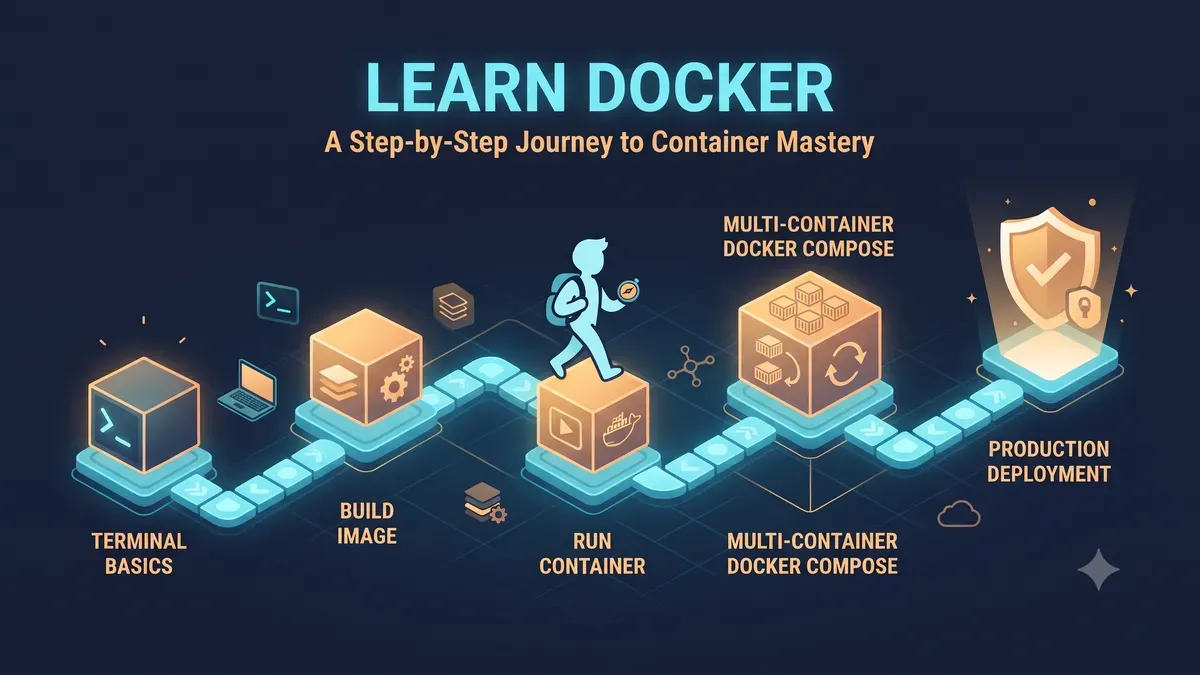
The honest answer is uncomfortable and useful at the same time. You can run your first container in an afternoon. You can deploy a small application with Docker Compose in a weekend. And you can still be surprised by a production incident two years later. Docker is a small core surrounded by a very large ecosystem, and the core is much easier than people expect.
This article gives you a realistic timeline, not a motivational one. It breaks down what actually takes time, what slows people down, and what the fastest path looks like for a beginner, a developer, and a system administrator.
If you prefer to start hands-on right now, my complete Docker guide covers the whole journey from first container to production hardening.
The short answer
| Level | Time | What you can do |
|---|---|---|
| Run your first container | 1 afternoon | docker run, docker ps, docker logs |
| Understand images and Dockerfiles | 2 to 3 days | Build a custom image for your own app |
| Use Docker Compose for a small stack | 1 weekend | Web app plus database, both in one file |
| Production habits (healthchecks, limits, security) | 2 to 4 weeks | Deploy something you would not panic about |
| Confident in a team environment | 1 to 3 months | Review Dockerfiles, debug incidents, coach others |
| Kubernetes on top of Docker | 3 to 6 months more | Orchestrate many containers across hosts |
The pattern is the same for every learner. The basics are fast. The distance between “I can run containers” and “I can run containers safely in production” is where the real time goes.
Why the core is faster than you think
Docker reuses ideas you already know. An image is a blueprint. A container is a running instance. A Dockerfile is a recipe. A volume is a USB drive that outlives the machine it was plugged into. The names are new, but the mental models map onto everyday objects, which is why beginners pick up the vocabulary so quickly.
The core commands number fewer than twenty. Pull an image, run a container, list what is running, check logs, exec into a shell, stop and remove. A focused afternoon covers all of them. My Docker first-steps guide walks through exactly this set, no jargon detours.
What is not fast is the ecosystem around the core. Networking modes, volume strategies, image optimization, multi-stage builds, CI/CD pipelines, orchestration. Each of those is a small topic on its own, and together they are the difference between a hobby container and a service you trust overnight.
Week-by-week timeline for a beginner
This assumes a few hours per day. If you can only give one hour a day, stretch each week to two.
Week 1: Containers, images, and Dockerfiles
Install Docker on your machine and run an official image the same day. Nginx, Redis, Postgres, pick one. Then build a Dockerfile for a tiny application you wrote, because copying a tutorial example sticks less than containerizing your own code.
By the end of the week you should be able to explain the image versus container difference without looking it up, and you should have broken a container on purpose and fixed it. Breaking things deliberately is the fastest teacher there is.
Week 2: Volumes, networking, and Compose
Data persistence and service communication are the two concepts that separate “I ran a container” from “I built a small system.” Learn named volumes versus bind mounts, and the three network modes, bridge, host, and none.
Then write a docker-compose.yml for an application with a database. A WordPress plus MySQL stack is the classic first project, and it is still a good one because it forces you to deal with two services talking to each other.
Week 3 to 4: Production habits
This week is where most people stall, because the work is unglamorous. Healthchecks, resource limits, log rotation, non-root users, and image scanning. None of these make a demo look more impressive, and all of them prevent the 2 AM pages.
The best way to learn them is to read about a real failure. My Docker container crash case study documents an actual production incident caused by a missing memory limit, and walking through someone else’s mistake is worth ten tutorials.
Week 5 and beyond: Real projects and the ecosystem
Put a small service into production, even if it is just for yourself. Give it a healthcheck, a restart policy, and a backup routine. The moment something is reachable from the internet, your learning curve gets steep in the best way.
From here the next step is orchestration. When one host is not enough, Kubernetes is the industry answer, but my honest advice is to make single-host Compose feel boring before you touch it. The complete Docker guide has a production hardening checklist that doubles as a skills checklist for this stage.
What actually takes time (not the commands)
If commands are easy and the ecosystem is big, where does the time really go? In my experience, three places.
First, debugging. Reading a crash log and knowing which command to run next is a skill that only comes from repetition. Exit code 137 means the OOM killer. Exit 1 means the application failed on its own. Log rotation fills the disk. You do not learn these patterns from a table, you learn them from incidents.
Second, unlearning assumptions. People who know virtual machines well often fight Docker’s shared kernel model for a week before it clicks. People who never touched Linux learn Docker commands quickly but hit a wall on networking and file permissions. The friction is different for everyone, and that is fine.
Third, judgment. The hard part of Docker is not running it, it is deciding when not to run it. Databases at large scale, real-time workloads, and GUI applications are all cases where containers can be the wrong answer. That judgment comes from running things long enough to watch them break.
The fastest path, in one paragraph
Use Docker every day on a real task, even a small one, instead of studying it in the abstract. Containerize your own side project, not a tutorial. Break it on purpose. Read one real incident write-up. Put one thing into production with healthchecks, limits, and a backup. If you do those four things, you will be ahead of most people who have been “learning Docker” for months by binging tutorials.
The biggest slowdown is tutorial fatigue. Watching videos and copying commands feels like progress, but it is the same few containers in different fonts. Every hour you spend debugging your own broken stack is worth five hours of passive learning.
How do you know you have actually learned it?
Pass a quick self-test. If you can do all of the following without searching, you are past the beginner stage:
- Write a Dockerfile with dependency-first ordering and a non-root user
- Explain why multi-stage builds shrink images
- Debug a container that exits immediately using logs and inspect
- Set a memory limit and explain what happens when it is hit
- Recover data from a named volume after deleting the container
- Deploy a two-service stack with Compose and update it without downtime
If any of those feel out of reach, that is not a failure, it is just a list of your next study sessions. The Docker complete guide covers every item on this list.
How long for developers versus sysadmins?
The destination is the same, the route differs.
- Developers already understand code, so Dockerfiles and image builds come fast. The gap is usually server-side concerns, networking, and debugging in production. Expect two to four weeks to feel solid, assuming daily hands-on work.
- Sysadmins already understand servers, processes, and networks, so production operations come fast. The gap is usually writing clean Dockerfiles and structuring applications for containerization. Similar two to four week range, different friction points.
If you are switching careers into DevOps, expect the honest longer timeline, three to six months, because you are learning Docker, Linux, networking, and CI/CD at the same time. It compounds, but it also stacks.
Frequently asked questions
Is Docker hard to learn? No, not the core. An afternoon gets you to your first container, and a weekend gets you to a working two-service stack. What is genuinely hard is production-grade operation, which takes practice, not intelligence.
Should I learn Docker before Kubernetes? Yes. Kubernetes orchestrates containers, and understanding containers first makes the orchestration layer make sense. Trying to learn both at once is how people burn out.
Do I need to know Linux first? It helps, especially file permissions and networking, but it is not a hard requirement. You can learn both at once, which is what most DevOps learners do anyway.
How much time per day do I need? Consistency beats intensity. One hour every day for three weeks beats eight hours on a single weekend, because Docker learning is about building intuition through repetition.
Where to go next
Docker is the foundation of the modern ops stack, and the learning curve is friendlier than its reputation suggests. Start with your own container today, move to Compose this weekend, and read one real incident before you put anything into production.
From here, the complete Docker guide takes you through images, volumes, networking, Compose, CI/CD, and a production hardening checklist. When containers start feeling routine, Ansible automates the hosts and Terraform provisions the infrastructure, and together they form the complete stack.
The timeline is honest: fast to start, real growth in weeks, mastery over years. The good news is that the part most people need, running containers confidently in production, is closer than you think.
I hope this timeline helps you plan your Docker learning without wasting weeks on the wrong path.
Implementation Checklist
- Replicate the steps in a controlled lab before production changes.
- Document configs, versions, and rollback steps.
- Set monitoring + alerts for the components you changed.
- Review access permissions and least-privilege policies.
Official References
Need a Hand?
If you want this implemented safely in production, I can help with assessment, execution, and hardening.
Contact MeDeploy on Cloud Infrastructure with $200 Free Credit
Spin up high-performance SSD cloud Droplets, managed Kubernetes, and databases in seconds. Test your containers and production workloads with $200 in free credits.
Transparency: We independently test and operate all recommended infrastructure. If you use our partner links, you receive free promotional credits and support our testing lab at zero extra cost to you.
Weekly Production DevOps Runbooks
Join 1,000+ infrastructure engineers receiving real-world Linux troubleshooting, Proxmox clustering setups, and Docker optimization runbooks every Tuesday. Zero spam, unsubscribe anytime.

About the Author
Kamandanu Wijaya
IT Infrastructure & Network Administrator
Infrastructure & network administrator with 15+ years of enterprise experience, focused on stability, security, and automation.
Certifications: Google IT Support, Cisco Networking Academy, DevOps.
pvscan Not Finding Disk: Troubleshooting Guide
next →Docker vs Kubernetes: Which One Do You Actually Need?
Need IT Solutions?
DoWithSudo is ready to help setup servers, VPS, and your security systems.
Contact Us