Docker Rootless Mode: Setup, Limitations, and Production
A build pipeline on a shared CI host was compromised for eleven minutes, and the report afterwards made uncomfortable reading. The attacker’s entry point was a dependency with a postinstall script, which is routine. The escalation step was not. The build job’s compose file mounted /var/run/docker.sock into a helper container so it could spawn sibling containers, and from inside that container the postinstall script ran a single command.
docker run -v /:/host --privileged alpine chroot /host sh -c 'id'It returned uid=0(root). Eleven minutes later the container had written a cron entry that survived on the host for two days before anyone noticed, because the host had no file integrity monitoring and the attacker was patient.
The lesson is not that the pipeline needed better dependency scanning, although it did. The lesson is that the Docker group is a root-equivalent privilege, and mounting the daemon socket into a container hands that privilege to whatever code runs inside it. Rootless mode removes the root daemon from the picture entirely, and it does so with user namespaces rather than with a policy that depends on nobody making a mistake.
What Rootless Mode Actually Changes
In a default installation, dockerd runs as root and creates containers inside the host’s user namespace. A process that is UID 0 inside a container is UID 0 on the host, subject only to capabilities and cgroup limits. Kernel privilege escalation bugs in that arrangement are host compromise bugs, and the container boundary is enforced by the kernel rather than by the daemon.
Rootless mode runs a second dockerd process as an unprivileged user. That daemon cannot do anything the user cannot do. When it creates a container, it creates a new user namespace in which the container’s UID 0 maps to a high numbered UID on the host, typically 100000 plus an offset allocated when the user was created. The mapping lives in /etc/subuid, and the kernel enforces it at every syscall boundary.
The practical consequence is that the chroot escape command from the opening story returns uid=100000 and cannot read the host root filesystem, because the namespace has no mapping for UID 0 outside itself. The same bug would still be a bug, but its blast radius is a user’s own home directory rather than the machine.
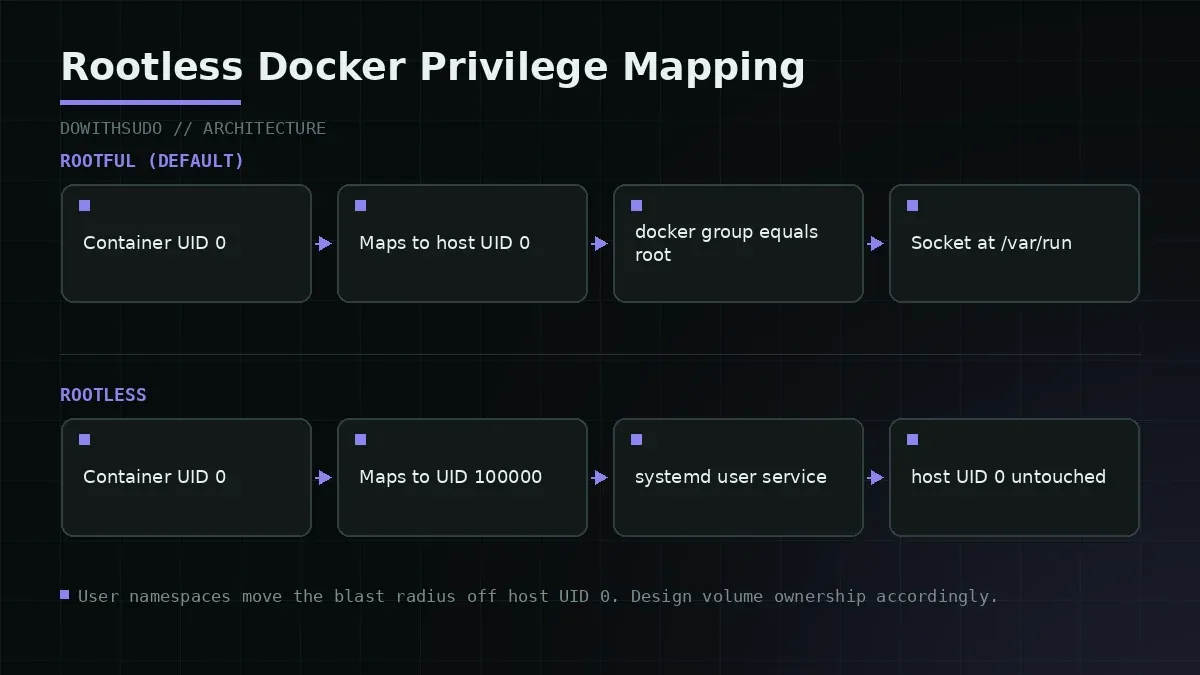
| Property | Rootful Docker | Rootless Docker |
|---|---|---|
| Daemon user | root | your user |
| Container UID 0 maps to | host UID 0 | host UID 100000+ |
| Docker socket | /var/run/docker.sock, root owned | $XDG_RUNTIME_DIR/docker.sock |
| Ports below 1024 | Native | Requires unprivileged_port_start |
| Default network | Bridge with kernel NAT | slirp4netns user space NAT |
--privileged | Works | Not available |
| Storage driver | overlay2 | fuse-overlayfs or native overlay |
| cgroup limits | Full | cgroup v2 with delegation |
The socket path difference does more to improve security than anything else on that list. Adding a developer to the docker group is equivalent to passwordless root, which is why the check getent group docker should return only accounts that genuinely need it. In rootless mode there is no shared socket to hand out, and each user’s daemon is only reachable by that user.
Step 1: Prepare the Host
Rootless mode needs a few packages and kernel features. The names differ slightly between distributions, and this is written for Debian 12 or Ubuntu 22.04 and newer, which covers most Proxmox and cloud instances.
# Packages that provide uid mapping and the user space network stack.
sudo apt update
sudo apt install -y uidmap dbus-user-session slirp4netns fuse-overlayfs docker-ce-rootless-extras

# Confirm cgroup v2 is in use. Rootless resource limits depend on it.
stat -fc %T /sys/fs/cgroup
# Expected: cgroup2fs
Then verify the subordinate ID ranges. Every user who will run a rootless daemon needs entries in both files, and the ranges must not overlap.
grep "$(whoami)" /etc/subuid /etc/subgiddeploy:100000:65536
deploy:100000:65536The pair means the user can map 65536 UIDs starting at 100000. If the lines are missing, add them and log out and back in.
sudo usermod --add-subuids 100000-165535 --add-subgids 100000-165535 deployTwo host level details matter for compatibility. On Debian and Ubuntu, unprivileged user namespaces are restricted by kernel.unprivileged_userns_clone, and some hardened images set it to zero.
sysctl kernel.unprivileged_userns_clone
cat /etc/sysctl.d/99-userns.conf 2>/dev/null
If it returns zero and you intend to run rootless containers, set it back to one. The setting exists to block known privilege escalation techniques that require creating user namespaces, which is the same primitive rootless containers rely on, so the trade-off is real rather than a misconfiguration you can ignore.
Finally, decide what happens to the system daemon. On a dedicated build host you can disable it and use rootless only, which is the cleanest outcome.
sudo systemctl disable --now docker.service docker.socketIf other services depend on the root daemon, leave it running and use a separate context name for rootless work so the two never mix.
Step 2: Install the Rootless Daemon
The dockerd-rootless-setuptool.sh script from the docker-ce-rootless-extras package does the setup and generates a systemd user unit.
dockerd-rootless-setuptool.sh install[INFO] systemd not detected, dockerd-rootless.sh needs to be started manually
[INFO] Creating /home/deploy/.config/systemd/user/docker.service
[INFO] starting systemd service docker.service
[INFO] Installed docker.service successfully.
[INFO] To control docker.service, run: systemctl --user (start|stop|restart) docker.serviceThen make the client point at the rootless socket and enable the service to start without an interactive login.
export PATH=/usr/bin:$PATH
export DOCKER_HOST=unix:///run/user/$(id -u)/docker.sock
systemctl --user enable --now docker
sudo loginctl enable-linger deploy
docker info --format '{{.ServerVersion}} {{.DockerRootDir}}'
26.1.4 /home/deploy/.local/share/dockerThe DockerRootDir value is your confirmation that the daemon is running rootless. If it points at /var/lib/docker, you are still talking to the system daemon. Add the DOCKER_HOST export to the user’s shell profile, or use a context so the choice is explicit in every session.
docker context create rootless --docker "host=unix:///run/user/$(id -u)/docker.sock"
docker context use rootless
docker context ls
Step 3: Networking and Ports Below 1024
Rootless containers reach the network through slirp4netns, which implements NAT in user space. That has two visible effects. Throughput is lower than the kernel bridge path, and published ports bind on the rootlesskit side rather than in the kernel’s netfilter tables.
# Publish a port the way you always have. It works, with one caveat.
docker run -d --name web -p 8080:80 nginx:alpine
curl -s -o /dev/null -w '%{http_code}\n' http://127.0.0.1:8080
Publishing on 127.0.0.1 works out of the box. Publishing on a specific external interface or on 0.0.0.0 so that other hosts can reach the container requires the rootlesskit port driver in most distributions.
# Check which port driver is active.
docker info --format '{{json .SecurityOptions}}'
ps -ef | grep -o 'port-driver=[a-z0-9]*' | head -1
If outbound access from another machine fails, set the driver in the daemon configuration and restart the user service.
{
  "iptables": false,
  "userland-proxy": false,
  "log-driver": "json-file",
  "log-opts": { "max-size": "20m", "max-file": "3" }
}
systemctl --user restart dockerPorts below 1024 need one more step, because the rootless daemon cannot bind privileged ports without a capability or a kernel threshold change. The cleaner of the two options is lowering the threshold for unprivileged binds.
# Allow unprivileged processes to bind ports 80 and up.
echo 'net.ipv4.ip_unprivileged_port_start=80' | sudo tee /etc/sysctl.d/99-unprivileged-ports.conf
sudo sysctl --system
docker run -d --name web80 -p 80:80 nginx:alpine
The alternative is setcap cap_net_bind_service=+ep against the rootlesskit binary, which grants the capability to a program rather than lowering a kernel threshold for every process. I prefer the sysctl on dedicated hosts and the capability approach on shared machines, where a lower threshold would benefit every user on the system.
Step 4: Storage Drivers and Mount Behaviour
With kernel 5.11 and newer, rootless mode can use the native overlay driver through idmapped mounts, which is roughly twice as fast as fuse-overlayfs for many small file operations. Check what your daemon chose before tuning anything else.
docker info | grep -i 'storage driver'If it reports fuse-overlayfs, you are paying a performance cost that usually shows up in CI job duration. Verify the kernel version first, then enable the native path.
uname -r
cat ~/.config/docker/daemon.json 2>/dev/null
Mount semantics are the part that breaks applications. A bind mount from the host into a rootless container is owned by the host user, which maps to UID 1000 inside the namespace unless you remap it. A container running as UID 0 inside cannot write to a host file owned by UID 1000 unless the file permissions allow it.
# Inspect what the host sees for a container's data.
ls -ln ~/.local/share/docker/overlay2 | head -3
# Files created by root inside a rootless container usually appear as UID 100000.
The fix is to match ownership deliberately rather than chowning to root and hoping. For a compose stack that writes to a bind mounted data directory, own the directory on the host as the user running the daemon, and run the application inside as the mapped UID.
install -d -m 0750 -o deploy -g deploy ~/apps/nextcloud/data
docker compose run --rm --user "$(id -u):$(id -g)" app chown -R app:app /data
Running Compose and Setting Limits
Compose works against the rootless daemon without changes once the context points at the right socket. Resource limits behave differently from the rootful case, and the difference is worth testing rather than assuming.
services:
  api:
    image: registry.example.com/company/api:v1.4.2
    restart: unless-stopped
    mem_limit: 512m
    cpus: 1.5
    logging:
      driver: json-file
      options:
        max-size: "20m"
        max-file: "3"
Inside a rootless container, the cgroup limits come from the user’s own slice, so a container can never exceed what the user session is allowed. On cgroup v2 with systemd delegation enabled, limits apply as expected. On a host still running hybrid cgroups, mem_limit may be silently ignored, which is worse than failing, because the container grows until the OOM killer picks a victim.
# Confirm cgroup v2 and delegation.
stat -fc %T /sys/fs/cgroup
systemd-cgls --user-unit docker.service | head -15
docker run --rm --memory 128m --memory-swap 128m alpine sh -c 'cat /sys/fs/cgroup/memory.max'
That last command should print 134217728, which is 128 MiB in bytes. If the file does not exist, you are on cgroup v1 and should plan the upgrade before relying on limits.
The container side of production readiness, including reverse proxy placement and secret handling, does not change much under rootless mode, and the patterns we use are collected in the Docker Compose production guide. Where rootless mode does change the calculus is on hosts that are already hardened at the kernel level, which is what the baseline in the Linux server hardening checklist covers.
Rootless mode is not a smaller version of Docker. It is the same engine with a different privilege model, and the differences show up in networking, mounts, and limits rather than in the command line.
Failure Modes and Troubleshooting
1. Permission denied writing to a bind mounted directory
Symptom: a container that ran fine under the root daemon now fails with Permission denied on a directory the application expects to own.
ls -ldn ~/apps/app/data
docker run --rm -v ~/apps/app/data:/data alpine id
docker run --rm -v ~/apps/app/data:/data alpine touch /data/test && echo writable
Compare the numeric owner on the host with the UID the container sees. In most cases the directory is owned by root on the host, which maps to nobody in the namespace. Change the host ownership to the user running the daemon, or run the container as a user whose mapped UID matches the host owner.
2. A published port is reachable locally but not from other hosts
Symptom: curl localhost:8080 works on the host, and every external request times out.
docker port web
ps -ef | grep rootlesskit | head -2
ss -tlnp | grep 8080
The port is bound by rootlesskit and, without the right driver, only on loopback. Enable rootlesskit as the port driver, restart the user service, and confirm with ss that the listener now appears on the external interface. If your distribution pins an older rootlesskit, upgrading the package is usually the fastest path.
3. The daemon disappears when the session ends
Symptom: containers stop when the SSH session closes, and systemctl --user status docker reports the unit as not running.
loginctl show-user deploy | grep Linger
sudo loginctl enable-linger deploy
systemctl --user is-enabled docker
Without lingering, systemd tears down the user session and every process in it when the last login ends. Enabling linger keeps the user manager alive at boot, which is what you want on a server.
4. A container needs a capability the rootless daemon cannot grant
Symptom: docker run --privileged fails with privileged mode is not allowed or a service that needs CAP_NET_ADMIN cannot start.
docker run --rm --cap-add=NET_ADMIN alpine sh -c 'ip link show | head -3'Rootless containers can add capabilities only within their own user namespace, and some operations, such as writing routes on the host, remain impossible by design. For those workloads, run the service on a dedicated host with the system daemon, or replace the tool with one that does not need the capability. Fighting the boundary is usually more expensive than working within it.
Production Verification Checklist
| Check | Command | Expected |
|---|---|---|
| Daemon is rootless | docker info --format '{{.DockerRootDir}}' | Path under the user home |
| Socket is user owned | ls -l /run/user/$(id -u)/docker.sock | Owned by the user |
| Subordinate IDs set | grep $(whoami) /etc/subuid /etc/subgid | Two matching ranges |
| No docker group members | getent group docker | Empty or unused |
| Linger enabled | loginctl show-user $(whoami) | grep Linger | Linger=yes |
| cgroup v2 active | stat -fc %T /sys/fs/cgroup | cgroup2fs |
| Limits honoured | docker run --rm --memory 128m alpine cat /sys/fs/cgroup/memory.max | 134217728 |
| Ports bind externally | ss -tlnp | grep <port> | Listener on 0.0.0.0 |
| Storage driver | docker info | grep -i 'storage driver' | overlay2 if kernel supports it |
| Socket not mounted anywhere | docker ps -a --format '{{.Names}}' | xargs -r docker inspect | No /var/run/docker.sock bind |
That last row is the one that would have prevented the eleven minute incident. Search for any container that mounts the daemon socket, because a single one reintroduces every risk that rootless mode removed. A read-only mount of the socket still grants the ability to start a privileged container, which is enough to escape.
Closing Thoughts
Rootless mode is one of the few hardening changes that removes an entire class of escalation rather than narrowing it. The cost is real, and it lands in three places: user space networking, mount ownership, and the absence of --privileged. All three are manageable once you know where they bite.
Start on the host where the risk is highest, which is usually the build server running untrusted dependencies. Run the same pipeline rootless for a week, then check the two numbers that matter: how long each job takes with fuse-overlayfs or native overlay, and how many of your compose files mount the daemon socket. The second number should be zero. If you are still choosing how to run containers in production generally, the lifecycle and networking fundamentals are in our Docker complete guide, and moving those workloads onto a rootless daemon afterwards is a smaller project than most teams expect.
Implementation Checklist
- Replicate the steps in a controlled lab before production changes.
- Document configs, versions, and rollback steps.
- Set monitoring + alerts for the components you changed.
- Review access permissions and least-privilege policies.
Official References
Need a Hand?
If you want this implemented safely in production, I can help with assessment, execution, and hardening.
Contact MeDeploy on Cloud Infrastructure with $200 Free Credit
Spin up high-performance SSD cloud Droplets, managed Kubernetes, and databases in seconds. Test your containers and production workloads with $200 in free credits.
Transparency: We independently test and operate all recommended infrastructure. If you use our partner links, you receive free promotional credits and support our testing lab at zero extra cost to you.
Weekly Production DevOps Runbooks
Join 1,000+ infrastructure engineers receiving real-world Linux troubleshooting, Proxmox clustering setups, and Docker optimization runbooks every Tuesday. Zero spam, unsubscribe anytime.
About the Author
Kamandanu Wijaya
IT Infrastructure & Network Administrator
Infrastructure & network administrator with 15+ years of enterprise experience, focused on stability, security, and automation.
Certifications: Google IT Support, Cisco Networking Academy, DevOps.
How to Extend LVM Thin Pool Without Unmounting on Linux Host
next →Cloudflare Tunnel vs Tailscale Subnet Router for Homelabs
Need IT Solutions?
DoWithSudo is ready to help setup servers, VPS, and your security systems.
Contact Us