Learning Ansible from Scratch, Automating Away Your Operational Pain
Picture your typical Monday morning in IT ops. You just received access to a fresh batch of 10 Linux servers. Your task sounds simple: install the basic stack, patch the OS, tighten the security, and push the latest web configuration.
In this article, we cover Ansible basics in a practical way so you can apply it with confidence.
If you are like most sysadmins starting out, you’ll reach for your terminal and start a repetitive dance. ssh user@server-01. Type a few commands. Exit. ssh user@server-02. Repeat. By the time you reach server ten, you are bored, likely have several typos, and you’ve forgotten if you enabled the firewall on server four.
This is what we call “Toil” repetitive, manual work that scales poorly and introduces risk. I lived in this world for years, convinced that my bash scripts were high-tech enough. That was until I discovered Ansible.
In this guide, I want to walk you through the journey of moving from manual labor to automated elegance. We’ll break down Ansible from a beginner’s perspective, focusing on what matters in real-world infrastructure.
What is Ansible, really?
Think of Ansible as a Remote Orchestrator.
If your servers are instruments in an orchestra, you are the conductor. Without a conductor, every musician (server) plays their own tune, often out of sync. With Ansible, you write a score (a Playbook), step onto the podium (your Control Node), and flick your baton. Every server follows your direction perfectly, simultaneously, and in harmony.
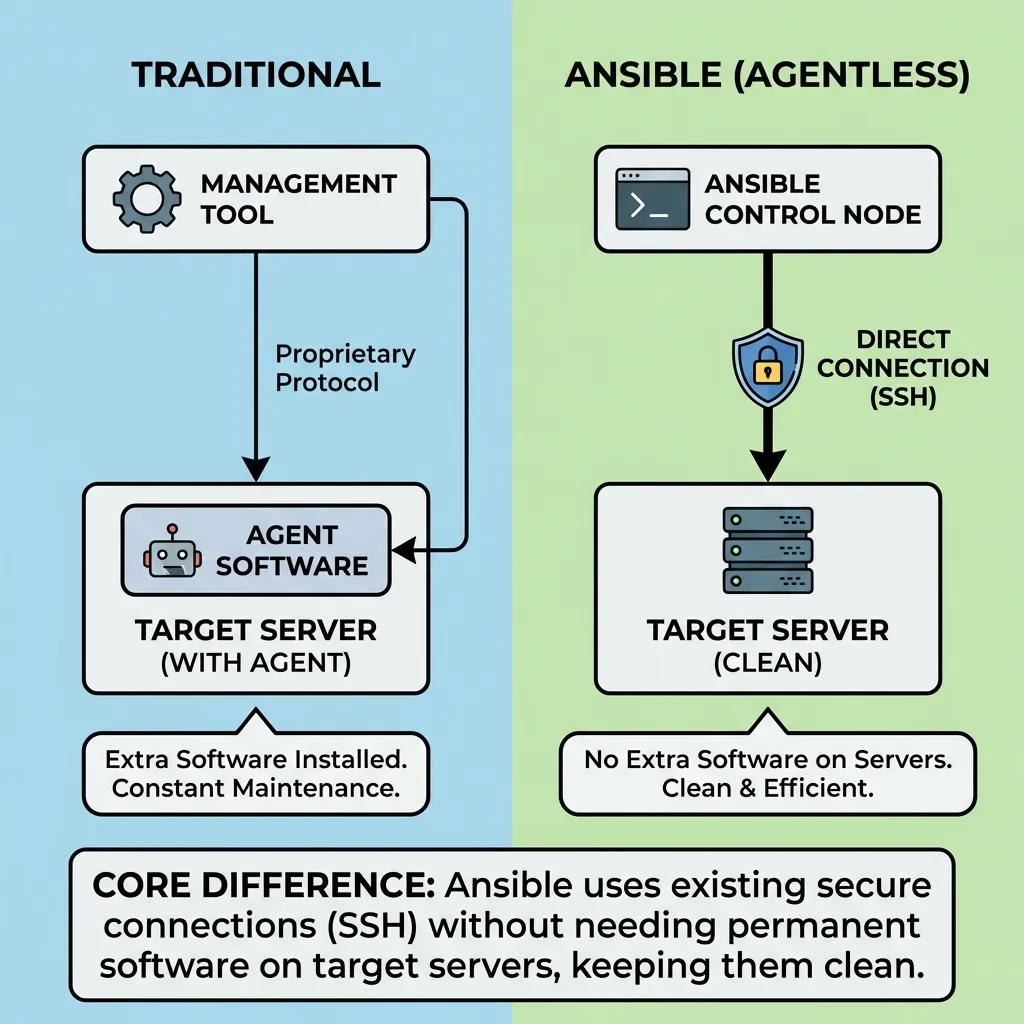
On a technical level, Ansible is a configuration management and orchestration tool. Its primary claim to fame? It is Agentless.
Most automation tools require you to install a “minion” or “agent” software on every managed server. Ansible doesn’t. It uses the existing secure connections you already have SSH. As long as your server has SSH and Python installed, it’s ready to be automated by Ansible.
How Ansible works (technical summary)
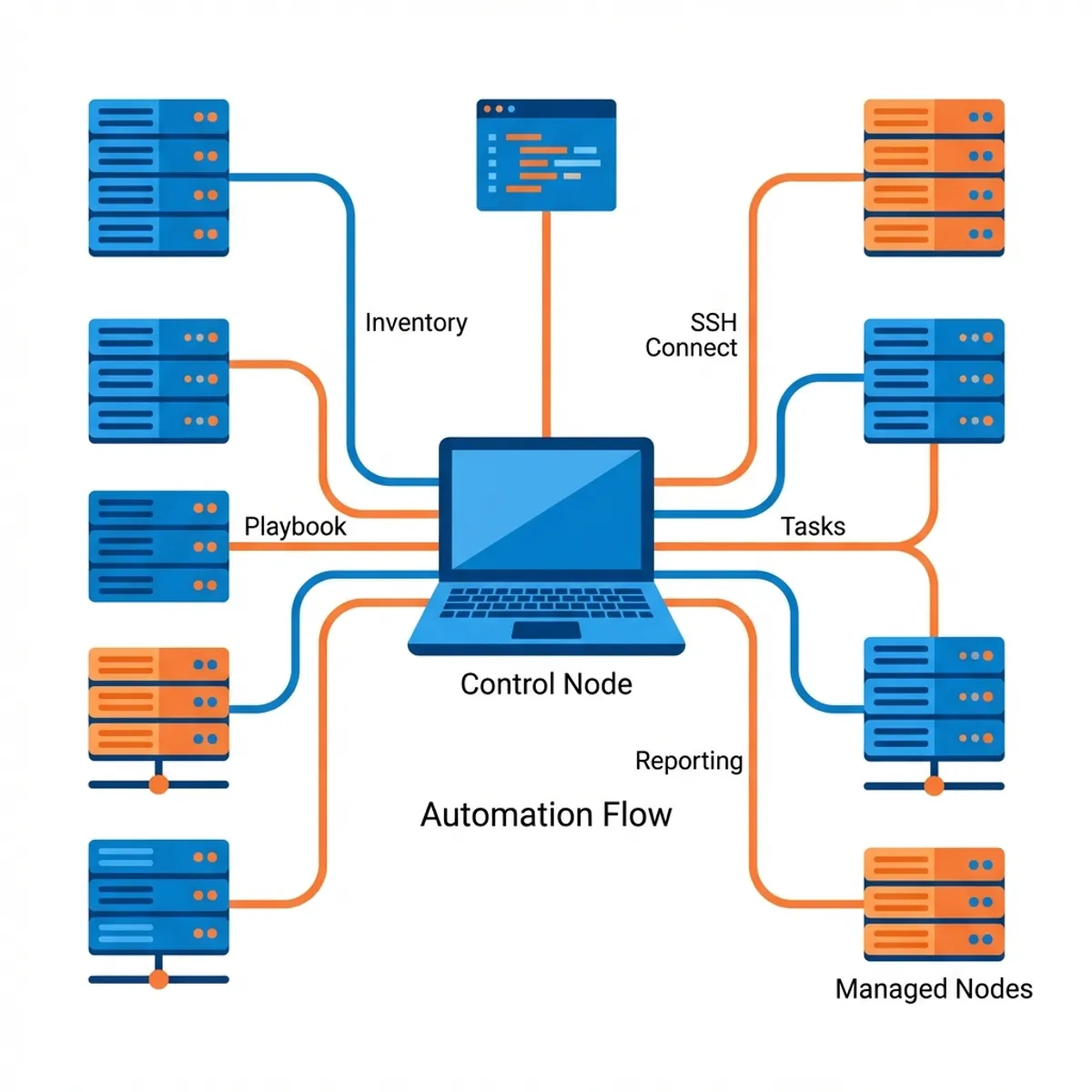
Ansible has a simple architecture:
- Control Node: where Ansible is installed (your laptop).
- Managed Nodes: the target servers.
- Inventory: list of targets (static or dynamic).
- Modules: unit of work executed on targets.
Workflow:
- Ansible opens SSH connections.
- Modules are shipped and executed via Python on the target.
- Results are evaluated as
changedorok.
This keeps Ansible lightweight, agentless, and easy to adopt.
Why not just use shell scripts?
This is the most common question I get. “I have a 500 line bash script that works fine. Why switch?”
The answer lies in a concept called Idempotency.
A shell script is usually “imperative” you tell it exactly what to do. If your script says mkdir /data, and that folder already exists, the script crashes unless you’ve wrapped it in complex if statements.
Ansible is “declarative”. You tell it the desired state. If you say “Ensure /data exists,” Ansible checks if it’s there first. If it is, it does nothing. If it isn’t, it creates it. This allows you to run the same automation ten times or a thousand times without fear of breaking a healthy system.
Setting the stage: installation
Ansible is installed only on your “Control Node” this could be your laptop or a dedicated management server.
For Ubuntu/Debian:
sudo apt update
sudo apt install software-properties-common
sudo add-apt-repository --yes --update ppa:ansible/ansible
sudo apt install ansible
For macOS (Homebrew):
brew install ansibleTest it out by running ansible --version. If you see the version details, you are officially an automation engineer in the making.
Building your inventory
Before we can issue commands, Ansible needs to know which servers it’s talking to. This list is called an Inventory.
Create a file named hosts.ini:
[web]
web-prod-01 ansible_host=10.0.0.51
web-prod-02 ansible_host=10.0.0.52

[database]
db-prod-01 ansible_host=10.0.0.60

[production:children]
web
database
By grouping servers like this, you can target specific layers of your infrastructure. You can upgrade Nginx on just the web group without touching your delicate databases.
Ansible config and SSH keys
To avoid typing flags repeatedly, create ansible.cfg in your project:
[defaults]
inventory = hosts.ini
remote_user = ubuntu
host_key_checking = False

[ssh_connection]
pipelining = True
Make sure your SSH key is installed on the targets:
ssh-copy-id ubuntu@10.0.0.51This speeds up runs and avoids password prompts.
Fleet management: ad-hoc commands
Ad hoc commands are perfect for quick, one off tasks. They allow you to harness the power of Ansible without writing a single line of YAML.
Want to check if all your servers are awake?
ansible all -m ping -i hosts.iniWant to see the uptime across your entire fleet?
ansible web -a "uptime" -i hosts.iniImagine the time saved. Instead of logging into dozens of servers to check a status, you get a unified report from one window in seconds.
The blueprint: playbooks
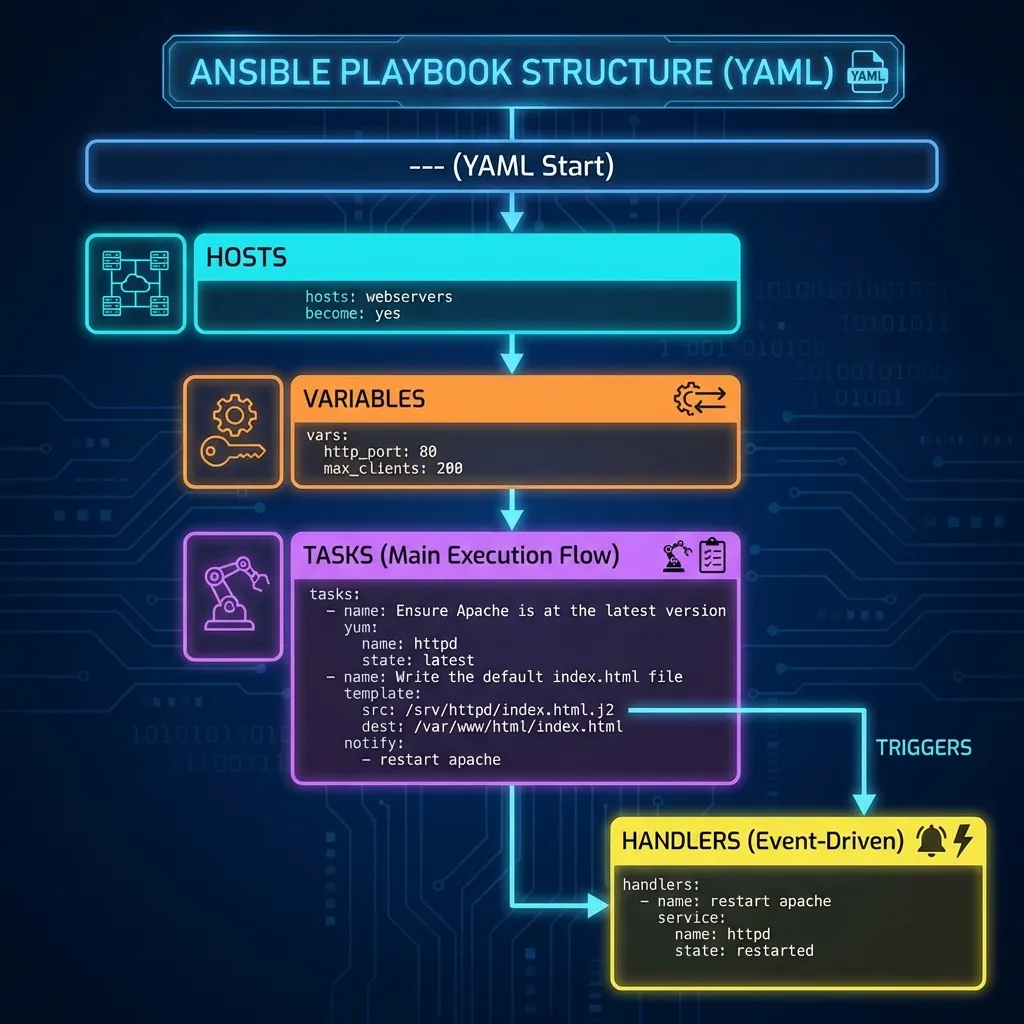
While ad hoc commands are great for quick checks, Playbooks are where the real magic happens. A Playbook is a YAML file that describes a sequence of steps to take on your servers.
Let’s build a Playbook to set up a basic Nginx server. Save this as site.yml:
---
- name: Automate My Web Server Setup
  hosts: web
  become: yes # Runs tasks as root/sudo

  vars:
    web_pkg: nginx

  tasks:
    - name: Install the web server package
      apt:
        name: "{{ web_pkg }}"
        state: latest
        update_cache: yes

    - name: Start and enable the service
      service:
        name: "{{ web_pkg }}"
        state: started
        enabled: yes

    - name: Deploy custom homepage
      copy:
        content: "<h1>Managed by Ansible</h1>"
        dest: /var/www/html/index.html
To run it:
ansible-playbook -i hosts.ini site.ymlAnsible will march through these tasks. If Nginx is already installed and running, it will simply report “OK” and move on. This is efficiency at its finest.
Variables and facts: make playbooks flexible
Ansible collects facts (OS, IP, CPU, etc.) from hosts. You can inspect them with:
ansible all -m setup -i hosts.iniExample usage:
- name: Print OS
  debug:
    msg: "Target OS is {{ ansible_distribution }} {{ ansible_distribution_version }}"
Use variables to keep playbooks reusable:
vars:
  app_port: 3000
Power tools: modules
In Ansible, you don’t write raw shell commands. You use Modules. These are standalone scripts that Ansible executes on your behalf. There are thousands of them for everything from managing AWS instances to configuring Cisco routers.
Core modules you should know:
- apt/yum/dnf: Package management.
- service/systemd: Managing service states.
- file: Managing permissions, directories, and symlinks.
- template: Using Jinja2 to create dynamic configurations.
- git: Pulling code directly into your servers.
Event driven tasks: handlers
Sometimes, a task should only run if something else changed. For example, you only want to restart Nginx if its configuration file was modified. We use Handlers for this.
    - name: Update Nginx Config
      template:
        src: nginx.conf.j2
        dest: /etc/nginx/nginx.conf
      notify: Restart Nginx

  handlers:
    - name: Restart Nginx
      service:
        name: nginx
        state: restarted
Handlers run at the end of a Play, and only if triggered. This prevents unnecessary downtime or service interruptions.
Professional organization: roles
As your automation grows, a single YAML file becomes a mess. Roles allow you to bundle your tasks, variables, files, and templates into a clean, reusable folder structure.
A standard role looks like this:
roles/
  common/       # Base setup for all servers
  webserver/    # Nginx specific logic
    tasks/main.yml
    handlers/main.yml
    templates/vhost.conf.j2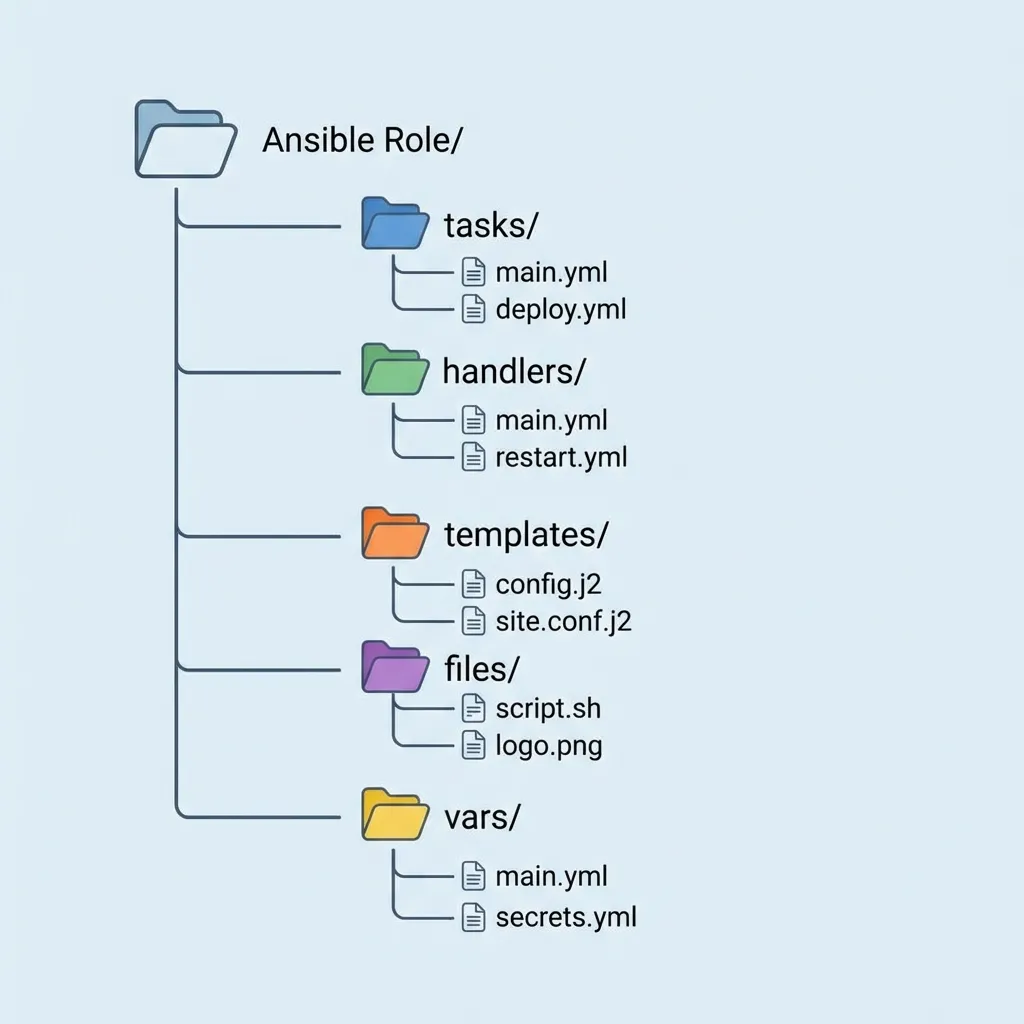
Tags, check mode, and diff
As playbooks grow, you need execution control:
- Tags: run only specific parts.
- Check mode: dry run without changes.
- Diff: show file changes before apply.
Examples:
ansible-playbook site.yml --tags "nginx"
ansible-playbook site.yml --check
ansible-playbook site.yml --diff
Secrets and Ansible vault
Never store passwords or tokens in plain YAML. Use Ansible Vault:
ansible-vault create secrets.yml
ansible-playbook -i hosts.ini site.yml --ask-vault-pass
This keeps secrets encrypted in your repo.
Production best practices
- Use
become: yesonly when needed. - Separate dev/staging/prod via inventory or var files.
- Run small, focused playbooks. Avoid “one playbook to rule them all.”
- Store playbooks in Git for auditability.
Avoiding the “newbie” traps
Even with Ansible, things can go wrong. Here’s how to stay ahead:
- YAML Syntax: YAML relies on spaces for indentation. Use two spaces, never tabs. One tiny indentation error will break the whole Playbook.
- Sudo/Privilege Escalation: If your tasks require root access, don’t forget
become: yes. If you forget the password prompt, use--ask-become-pass. - SSH Key Management: Ansible is only as good as its connection. Make sure your SSH keys are deployed to your managed nodes.
Real world business impact
When I started using Ansible in a professional setting, the ROI (Return on Investment) was immediate.
- Disaster Recovery: If a server dies, I can spin up a new one and have it fully configured in 5 minutes by running a Playbook.
- Security Compliance: I can audit my entire fleet for a specific security patch with one command.
- Team Collaboration: Because my Playbooks are in Git, other engineers can see exactly how the infrastructure is configured.
Your journey begins
You’ve just scratched the surface of infrastructure automation. Ansible is a deep tool with a brilliant community. To keep growing, I highly recommend:
- Ansible Galaxy: A public marketplace of free, pre-written roles. Don’t reinvent the wheel if you don’t have to!
- Molecule: A testing framework that lets you test your Playbooks inside ephemeral Docker containers before hitting production.
- CI integration: Connect Ansible to your GitHub Actions or GitLab CI.
Ansible is often used alongside other Infrastructure as Code tools. If you want to learn how to provision cloud resources before configuring them with Ansible, check out my Terraform beginner’s guide. For real examples of why proper configuration matters, see my Docker production incident case study.
Automation isn’t just about saving time; it’s about making your systems more reliable and your life as an engineer more enjoyable. You are no longer just a “user” of servers; you are their architect.
Good luck on your automation journey. If you run into issues, remember that the Ansible community is massive and the answer is likely one search away.
I hope this guide on Ansible basics helps you make better decisions in real-world situations.
Implementation Checklist
- Replicate the steps in a controlled lab before production changes.
- Document configs, versions, and rollback steps.
- Set monitoring + alerts for the components you changed.
- Review access permissions and least-privilege policies.
Official References
Need a Hand?
If you want this implemented safely in production, I can help with assessment, execution, and hardening.
Contact Me
About the Author
Kamandanu Wijaya
IT Infrastructure & Network Administrator
Infrastructure & network administrator with 14+ years of enterprise experience, focused on stability, security, and automation.
Certifications: Google IT Support, Cisco Networking Academy, DevOps.
View ProfileNeed IT Solutions?
DoWithSudo team is ready to help setup servers, VPS, and your security systems.
Contact Us