Cloud Computing for Beginners
Three years ago, I sat in front of my laptop with mixed feelings. On one hand, I felt comfortable with my job as an on premise System Administrator. Physical servers, racks, UTP cables. Everything felt familiar.
But on the other hand, I saw a trend I could not ignore. Job listings started mentioning “AWS”, “Azure”, “GCP” as requirements. Clients started asking about migrating to the cloud. Younger colleagues were already fluent talking about Kubernetes and serverless.
“Am I already behind?” I thought.
Turns out, no. Learning cloud in your 30s is not impossible. In fact, experience in traditional infrastructure becomes a strong foundation. What you need is clear direction and consistency.
This article is the guide I wish existed when I started. Not academic theory, but practical tips from someone who has been through the process.
Why cloud has become essential
Before talking about how to learn, let us first understand why cloud computing is so dominant now.
The paradigm shift
Back in the day, building IT infrastructure meant buying physical servers, renting data center space, and hiring engineers for 24/7 maintenance. It took weeks to provision a single new server.
Now? I can spin up 10 servers on AWS in 5 minutes. Pay only for what I use. Scale up when traffic is high, scale down when it is quiet. No need to worry about hardware failure because that is the provider’s responsibility.
This is not just a technical change. This is a fundamental shift in how businesses operate.
What companies are looking for
Based on my observations from various job postings and interviews:
- Understanding of core concepts: VPC, EC2/VM, S3/Storage, IAM
- Hands on experience: Not just theory, but actually deploying real applications
- Infrastructure as Code: Terraform, CloudFormation, or Pulumi
- Containerization: Docker and Kubernetes are increasingly becoming standard
- Cost optimization mindset: Cloud can be expensive if not managed properly
Choosing a cloud provider to learn
The classic question: AWS, Azure, or GCP?
My recommendation: start with AWS
Not because AWS is technically the best. But because:
- Largest market share: Over 30% global market share. More job openings.
- Most complete documentation: AWS has very detailed documentation and a large community.
- Generous free tier: 12 months of free access for many basic services.
Once you understand the concepts in AWS, moving to Azure or GCP is relatively easy. The concepts are similar, only the names and interfaces differ.
Alternatives for limited budgets
If you are worried about costs, here are some options:
- AWS Free Tier: t2.micro instance free for 12 months
- Google Cloud Free Tier: $300 credit for the first 90 days
- Azure for Students: $100 credit without a credit card (if you have a .edu email)
- Oracle Cloud Free Tier: Some VMs free forever (not just 12 months)
Most importantly, always set a budget alert. Horror stories about thousand dollar bills from forgotten instances are real. I learned that lesson with an $847 bill, full story in the AWS Free Tier billing trap case study.
The core cloud concepts to learn first
Jumping straight into the console without the mental model is how beginners drown. Spend the first week on concepts, not clicks. Here are the ones that carry every other skill.
Virtualization and the shared model
Cloud runs on virtualization. A physical server runs many virtual machines, and the provider manages the hardware while you manage what runs on top. Understand the difference between the provider’s responsibility and yours. In AWS terms, this is the shared responsibility model. The provider secures the physical layer, you secure what you configure.
Regions and availability zones
Cloud resources live in a physical location called a region, for example us-east-1 or ap-southeast-1. Inside a region, resources can run in multiple availability zones, which are isolated data centers a few kilometers apart. Deploying across zones is how you survive a data center outage. Choosing a region close to your users matters for latency, and some regions cost more than others.
The three building blocks
Everything you deploy is one of three things:
- Compute: VMs (EC2), containers (ECS, EKS), or serverless functions (Lambda). This is where your code runs.
- Storage: object storage (S3), block storage (EBS), and databases (RDS, DynamoDB). This is where your data lives.
- Networking: VPC, subnets, security groups, load balancers. This is how resources talk to each other and the internet.
Learn one from each category and you can build almost anything.
Identity and access: IAM
IAM is the permission system of the cloud. Every action you take is checked against a policy. The beginner instinct is to use the root account for everything. Break that habit on day one. Create a user, attach only the permissions you need, and rotate keys like you rotate passwords. Most cloud breaches start with a leaked access key, not an exotic exploit.
Pricing models
Cloud prices itself per use. On-demand means you pay per hour and can stop anytime. Reserved instances mean you commit for a year or three and pay less. Serverless means you pay per request. The same workload can cost ten times more or less depending on how you buy it. Learning the pricing model of each service is part of learning the service.
Containers and serverless
You will hear these two words constantly. Containers package an application with its runtime so it runs anywhere. Serverless lets you run code without thinking about servers at all, the provider handles everything. They are not competitors, they are different tools for different jobs. My Docker complete guide covers the container side of that story.
A realistic learning roadmap
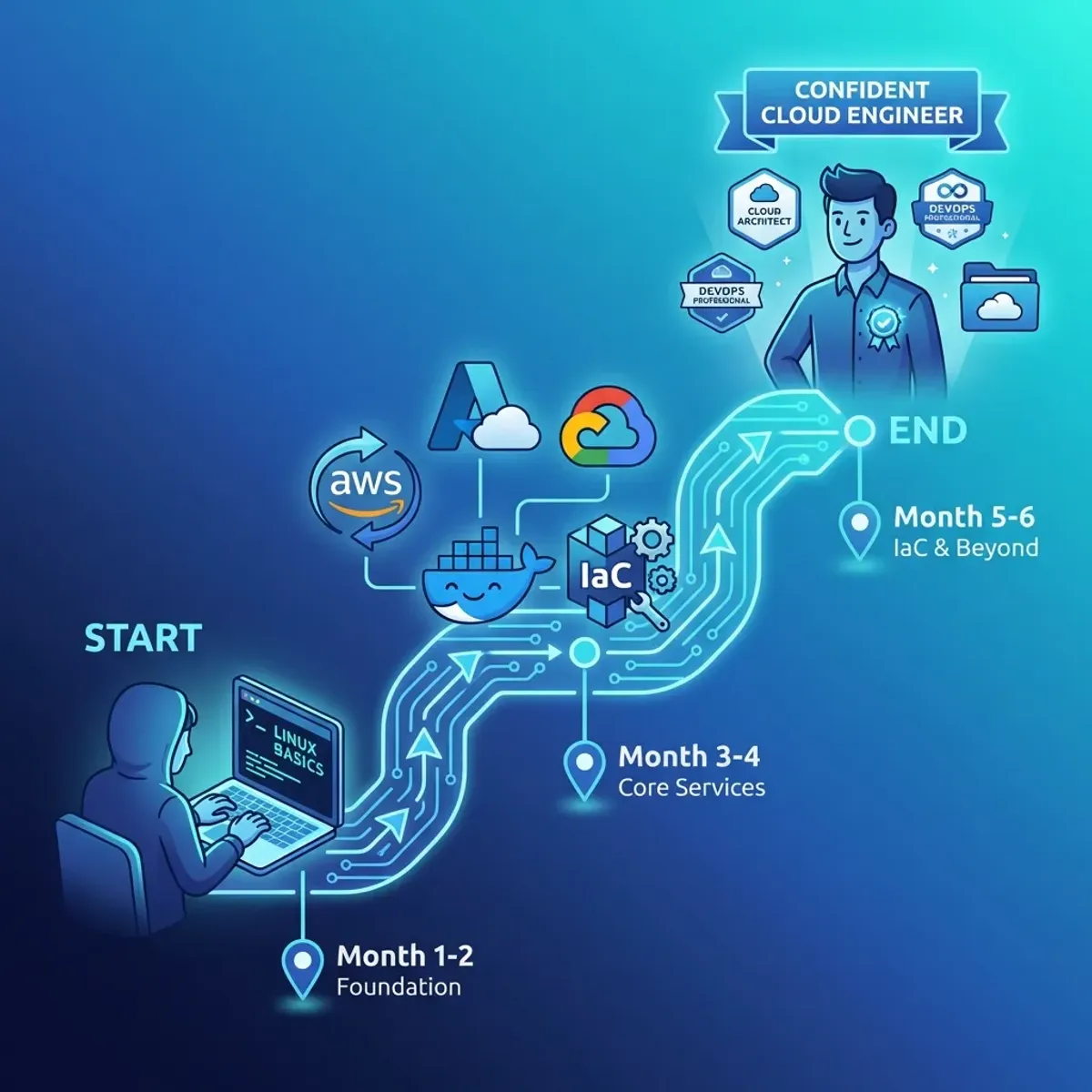
Here is the path I recommend for beginners.
Month 1 to 2: foundation
Goal: Understand basic cloud and infrastructure concepts.
Topics to master:
- What virtualization is and how the cloud uses it
- Basic networking (IP, subnet, DNS, firewall)
- Linux command line (very important)
- IAM concepts (Identity and Access Management)
Hands on:
- Create an AWS Free Tier account
- Launch your first EC2 instance
- SSH into the instance, install Nginx, access from browser
- Understand Security Groups and how to open ports
If you are not familiar with Linux yet, I suggest learning Linux basics for System Administrators first.
Month 3 to 4: core services
Goal: Master core AWS services.
Focus on:
- EC2: Instance types, AMI, EBS storage
- S3: Object storage, bucket policies, static website hosting
- VPC: Custom VPC, subnets, NAT gateway, routing
- RDS: Managed database, backup, read replicas
Hands on:
- Deploy a simple web application on EC2
- Setup an RDS database and connect it with the application
- Configure a VPC with public and private subnets
- Host a static website on S3
Month 5 to 6: automation and iac
Goal: Learn Infrastructure as Code.
This is what separates professional Cloud Engineers from those who can only click around in the console.
Focus on:
- Terraform: Most popular IaC tool, multi cloud
- CloudFormation: Native AWS, great for AWS only environments
- Ansible: For configuration management
Hands on:
- Recreate the infrastructure you built manually using Terraform
- Create reusable Terraform modules
- Setup a CI/CD pipeline for deploying infrastructure
For Terraform, I have written a complete Terraform guide from scratch that can be a reference. If you are torn between learning Terraform or Ansible first, my Terraform vs Ansible comparison lays out the difference and gives you a clear recommendation.
Month 7 onwards: specialization
After the foundation is strong, pick one area to dive deep into:
- DevOps/SRE: CI/CD, Kubernetes, monitoring, observability
- Cloud Architecture: Design patterns, well architected framework
- Security: IAM deep dive, encryption, compliance
- Data Engineering: Data lakes, analytics services, ETL
For a real-world example of cloud architecture decisions, check out the hybrid cloud migration case study linked in the roadmap above, which walks through keeping legacy systems on-premise while moving the rest to AWS.
Your first guided project
A roadmap without a project is just a wishlist. Here is the smallest project that touches compute, storage, networking, and a database, the four pillars of cloud.
Build a personal notes app. The stack is deliberately simple:
- A free tier EC2 instance running the application
- A security group that only allows SSH and HTTP from your IP
- An S3 bucket for uploaded attachments
- An RDS free tier database for the notes
Deploy it by hand the first time, clicking through the console. Then delete everything and redeploy it using Terraform. The second pass is where the concepts click. You will hit every beginner problem, port not open, database not reachable, instance not in the right subnet, and fixing all of them is the actual learning.
When you are done, write a README with the architecture diagram and push it to GitHub. That single project demonstrates more than any certification.
Cloud cost management from day one
The biggest reason people quit cloud learning is the bill. I have seen more people quit after a surprise invoice than after a hard exam. The pattern is always the same: a “free” service that was free in one configuration and paid in another, or a resource forgotten in a region nobody checks.
Three habits prevent it:
- Budget alerts before anything else. Create a budget the same day you create the account, with email alerts at 50%, 80%, and 100%. Ten minutes, zero excuses.
- Enable free tier usage alerts. AWS sends you an email when you approach the monthly free tier limits. Most people never turn this on.
- Clean up as part of the workflow. After every learning session, terminate instances, delete snapshots, and release elastic IPs. Make cleanup the last step of the session, not a chore for later.
For the exact steps to check whether your account is still eligible, and to read the usage dashboard before it surprises you, see my AWS free tier status guide.
Practical tips often overlooked
Do not just watch tutorials
YouTube is full of tutorials “Deploy X on AWS in 10 minutes”. Watching is good for an initial overview. But if you only watch without practicing, the knowledge will not stick.
What to do:
- Watch once for overview
- Practice on your own without looking at the video
- When stuck, then watch again
- Document the process and errors you encounter
Learn from errors, do not avoid them
Error messages are the best teachers. When an EC2 instance cannot be accessed, do not just delete and recreate it. Debug. Check the Security Group. Check the Route Table. Check the NACL.
This debugging process is what builds deep understanding.
Build a real portfolio
Certifications are nice, but a portfolio is better. Some project ideas:
- Static website with CI/CD: S3 + CloudFront + GitHub Actions
- Serverless API: Lambda + API Gateway + DynamoDB
- Three tier web app: Load Balancer + EC2 + RDS
- Kubernetes cluster: EKS with autoscaling
Document every project on GitHub with a clear README. This is what recruiters will look at.
Join communities
Learning alone is hard. Join communities to:
- Ask questions when stuck
- Get insights from more experienced people
- Motivation from fellow learners
Some active communities:
- r/aws and r/devops on Reddit
- Discord servers of various cloud communities
- Local meetups in your city
Do not get trapped in tutorial hell
This is a classic trap. Finish one course, immediately take another course. Feeling “not ready yet” to practice.
The reality is, you will never feel 100% ready. What makes the difference is the courage to start even when not perfect.
Finish one course, then practice immediately. Build something. Break it. Fix it. Repeat.
What real deployments look like
Theory stays abstract until you see how production systems are actually put together. Three of my case studies show the patterns you will meet in the field.
The MERN migration to DigitalOcean walks through moving a full-stack application to a cloud VM, including the database, the reverse proxy, and the firewall decisions that came with it. The hybrid cloud migration case study shows the other extreme, keeping part of the stack on-premise while the rest moves to AWS, a common pattern in companies with legacy systems. And when your cloud server starts responding slowly under normal load, the intermittent slow web server case study demonstrates the diagnosis flow, which is most of the job.
Read them as a supplement to your practice, not a replacement for it. The patterns stick when you have already hit the same problem yourself.
Common beginner mistakes
I made every mistake below, and I have watched hundreds of learners repeat them.
- Skipping the concepts. Going straight to clicking without understanding VPC, IAM, and pricing. You end up with infrastructure you cannot explain or fix.
- Using the root account for everything. One leaked key and the whole account is exposed. Create a restricted user from day one.
- Ignoring cost controls. No budget alert, no free tier alert, no cleanup habit. The bill is the teacher nobody wants.
- Hoarding unused resources. Instances, snapshots, and elastic IPs accumulating in forgotten regions. Clean as you go.
- Following tutorials without understanding. Copying commands is fine, understanding why the command exists is the skill. Change one parameter and watch what breaks.
If you recognize yourself in two or more of these, that is normal. The fix is not talent, it is process.
About certifications
A question that often comes up: are certifications important?
Honest answer: It depends on the situation.
When certifications help
- Career transition: From non IT to cloud, or from traditional IT to cloud
- Fresh graduates: As proof of commitment to learning
- HR filter: Some large companies use certifications as an initial filter
When certifications are less relevant
- Already have proven experience: Portfolio and track record speak louder
- Startup companies: Usually look more at practical abilities
Recommended AWS certification order
- AWS Cloud Practitioner: Entry level, general understanding
- AWS Solutions Architect Associate: Most sought after, design focused
- AWS Developer Associate or SysOps Associate: Depending on career direction
- Specialization: Security, Database, Network, etc.
Preparation for Solutions Architect Associate usually takes 2 to 3 months of consistent study.
Mindset to develop
Cloud changes fast
New services appear every month. Best practices change. What you learn today might be outdated in 2 years.
This is not a reason not to learn. This is a reason to build the ability to learn quickly (learning how to learn).
Cost is a feature
On premise, cost is a sunk cost. Already bought the server, done.
In cloud, every resource has a price tag. Cost optimization skills become very valuable. Companies will greatly appreciate engineers who can deliver results while keeping costs efficient.
Failure is normal
In cloud, everything can fail. Instances can die. Regions can go down. What makes the difference is how you design systems to keep running even when components fail.
This “design for failure” mindset is at the core of cloud architecture.
FAQ for beginners
Can I learn cloud for free? Yes. AWS Free Tier gives you a year of basic services, GCP gives $300 in credits, and Azure has a student program. The real cost is time, not money, if you set up budget alerts and clean up after yourself.
Do I need to know programming first? No. You need the Linux command line and basic networking. Scripting helps later, especially for Infrastructure as Code, but it is not a prerequisite for the first months.
AWS, Azure, or GCP? Start with AWS for market share and documentation volume. The concepts transfer, so your second provider takes a fraction of the time.
How long until I am employable? With consistent daily practice, most people can build and explain a three tier deployment in four to six months. The portfolio matters more than the timeline.
Is the cloud going to replace sysadmins? It changes the job, it does not remove it. Someone still designs the VPC, writes the Terraform, and fixes the 3 a.m. incident. That someone is a sysadmin who learned cloud.
Closing thoughts
Learning cloud computing in 2026 is no longer a choice, but a necessity for anyone who wants a career in IT infrastructure. The good news is, resources for learning are more abundant than ever. Free tier is available. Documentation is complete. Communities are supportive.
What is needed is consistency and the courage to start.
Do not be afraid because you feel you are already late. Do not stop at tutorials without practicing. Do not wait until you feel “ready”.
Start now. Create a cloud provider account. Launch your first instance. Break it. Fix it. Repeat.
I have written about the journey of leaving the IT Support comfort zone that might be relatable if you are at a transition point.
Implementation Checklist
- Replicate the steps in a controlled lab before production changes.
- Document configs, versions, and rollback steps.
- Set monitoring + alerts for the components you changed.
- Review access permissions and least-privilege policies.
Official References
Need a Hand?
If you want this implemented safely in production, I can help with assessment, execution, and hardening.
Contact MeDeploy on Cloud Infrastructure with $200 Free Credit
Spin up high-performance SSD cloud Droplets, managed Kubernetes, and databases in seconds. Test your containers and production workloads with $200 in free credits.
Transparency: We independently test and operate all recommended infrastructure. If you use our partner links, you receive free promotional credits and support our testing lab at zero extra cost to you.
Weekly Production DevOps Runbooks
Join 1,000+ infrastructure engineers receiving real-world Linux troubleshooting, Proxmox clustering setups, and Docker optimization runbooks every Tuesday. Zero spam, unsubscribe anytime.

About the Author
Kamandanu Wijaya
IT Infrastructure & Network Administrator
Infrastructure & network administrator with 15+ years of enterprise experience, focused on stability, security, and automation.
Certifications: Google IT Support, Cisco Networking Academy, DevOps.
Need IT Solutions?
DoWithSudo is ready to help setup servers, VPS, and your security systems.
Contact Us